
simonem5506630
Participant
March 22, 2019
Question

Random Button Bug

  • March 22, 2019
  • 2 replies
  • 304 views

Hi guys.

I'm trying to create a quiz with an interactions, radio button. So, I put everything: image on the background, the interaction "radio button", input the texts and when I publish, the text of options just appear cutted. I'v tried everything to fix this, but i just don't know how! Following some prints of the problem. Someone can help me?

Oh, its's captivate 9.

tks a lot!

Simone
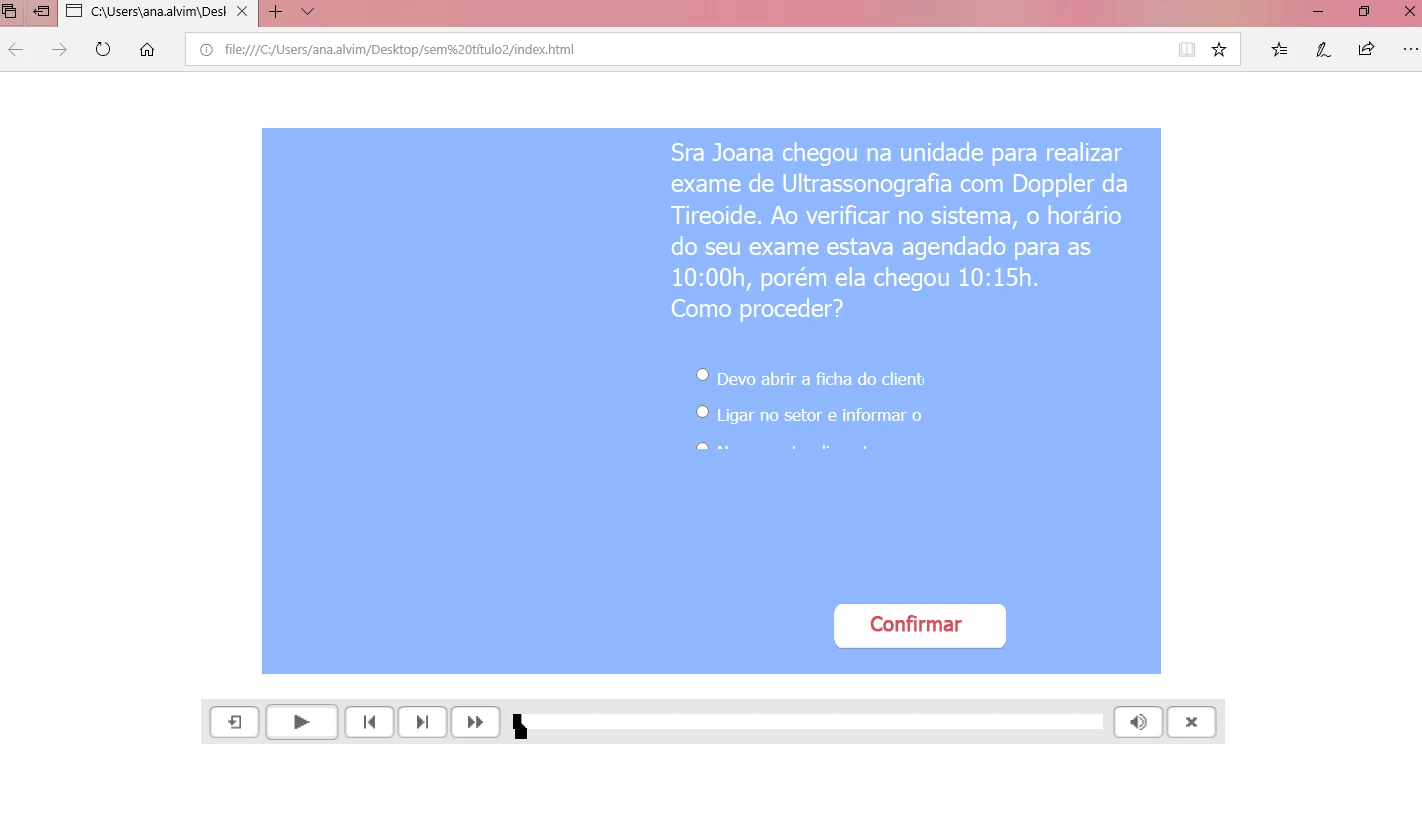
This topic has been closed for replies.

2 replies

Lilybiri
Legend
March 22, 2019

Which version of 9? Make sure to have the most recent one: 9.0.2.

Did you resize the radio button interaction? I don't remember if the functionality existed in CP9: Refresh button in the Properties panel.

If this is a non-responsive project, could you please check with Preview HMTL in Browser (F11), not with Preview Project which is using SWF output.

MichaelStephens
Legend
March 22, 2019

Are you using the radio button widget?

simonem5506630
Participant
March 22, 2019

Yep!!

Known Participant
July 12, 2019

Since there are multiple threads on this same subject that Adobe still hasn't gotten around to fixing... the answer is in this thread:

Re: CP9 and Radio Button Widget no displaying in HTML5 when published

Need to modify the template and/or index.html file by adding this line UNDER the existing <style> element already in the created file, not as a part of it:

<style type="text/css">.cp-widget iframe {width:####px !important; height:####px !important;}</style>

### = pixel width/height of the radiobutton widget that you want set. It will layer the iframe over any other elements on the screen should one set it bigger than it needs to be and make any elements underneath unselectable.

--kC