Participant
September 18, 2018
Answered

Recorded video demo doesn't stop where it's supposed to

  • September 18, 2018
  • 2 replies
  • 755 views

I saw another user asked this question 2 years ago and there's no answer.  I recorded a video demo.  In the preview and in the published version the demo loops back around to the beginning. I can tell because the image is different and it repeats some of the audio. I don't understand why it's doing that.  Here's a screenshot of the timeline.  Everything looks ok and I don't see a setting that refers to any looping.  Even playing it in the preview I can see the marker jumping back to the beginning at the end of the playback.  Any help is appreciated!

This topic has been closed for replies.
Correct answer Lilybiri

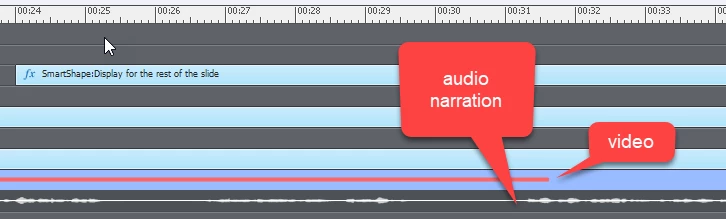
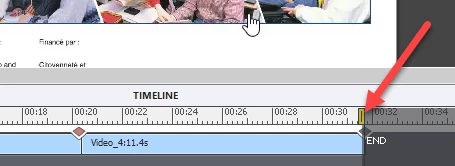
Thank you for your response, Libybiri.  Yes - I"m talking about a video demo (or screencase video recording). I find it a lot easier to do the video demo, then add audio narration and other images to the slide later (like arrows or other images) - I've added a screenshot of the timeline below. You'll see that my video ends, but I'm still narrating and pointing to images on the last video shot. The intention was to keep the final image of the video on the screen, but the problem was that the video looped to its beginning again. I was able to fix the looping by moving the END marker so that it was just before the transition marker at the end of the video (second screenshot below).
I have to disappoint you but you are looking for issues. Both audio and video clips are heavy files. To keep them synrhronized is a pain.

This is my workflow for video demo, because I also like to focus on one task when recording:

  • I write out the script for the audio/video
  • I record the Video demo and audio, in sort of a draft version mostly aimed at having the video in an appropriate tempo (sorry for that musical term)
  • I avoid recording long video demo's, prefer to add new video clips at the end of the previous ones. That makes it easier to add static objects later on, and/or to convert the video to an interactive video with overlay slides.
  • I will edit the video clips, but each of them will have its individual audio clip.
  • When editing is done I will record the 'definite' audio clip in Audition and replace the draft audio clips. I know how long they need to be to have the appropriate synching
  • If necessary I will edit again, but that will be minor changes.

Maybe I have to write out this workflow in a blog?

2 replies

akaskens
Known Participant
January 8, 2019

I have the same question (using captivate 201). I have a video recording on a slide, which I've also added audio to (which is outside the video recording). The video recording loops. I'm not sure why - on other slides where I have a video recording. the video recording stops (e.g., say at 30 seconds) and my audio continues.

Lilybiri
Legend
January 8, 2019

Are you really talking about a video demo? Audio should be inlcuded in the video demo recording, not separately.

akaskens
Known Participant
January 8, 2019

Thank you for your response, Libybiri.  Yes - I"m talking about a video demo (or screencase video recording). I find it a lot easier to do the video demo, then add audio narration and other images to the slide later (like arrows or other images) - I've added a screenshot of the timeline below. You'll see that my video ends, but I'm still narrating and pointing to images on the last video shot. The intention was to keep the final image of the video on the screen, but the problem was that the video looped to its beginning again. I was able to fix the looping by moving the END marker so that it was just before the transition marker at the end of the video (second screenshot below).

Dominic Michael
Adobe Employee
Adobe Employee
October 1, 2018

Is the audio getting looped or the video?

Can you please check any background audio is linked?
