


Answered
Recorded Video from Desktop has glitched sound on playback
Hi everyone,
First-time poster here. I hope you can help us. We have a user that has issues when recording video from their desktop. We have sent a bug report but there's no answer yet.
Here are the steps to reproduce the issue according to the user:
Steps to Reproduce Bug:
- Go to File > Record a New > Video Demo
- Choose ‘Screen Area’ or ‘Application’. For webcam, select ‘No Webcam’ and tick ‘System Audio’.
This is the audio setting used
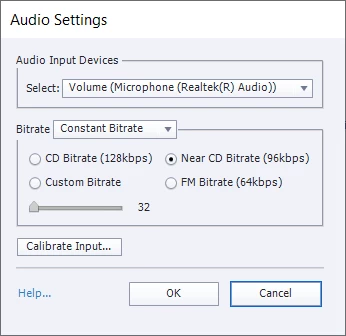
- Click ‘Record’. (Record any videos that are playing on the computer)
- End recording
- The recorded video preview pops up and video starts to play. It is fine at the start, after a few seconds the audio starts to glitch (sample is attached).
We have updated the user's laptop system drivers (including video and audio) but this did not make a difference. The only version we can update Captivate is until 11.5.5. The user has an external mic but he has confirmed that he has removed it during testing and it still made the audio issue.
I have also attached the video that is having the issue. Any feedback would be greatly appreciated.
Thanks!
 AdChoices