Inspiring
November 17, 2023
Answered

Relaunching quiz takes me to previos attempt's score page

  • November 17, 2023
  • 2 replies
  • 1011 views

Hi,


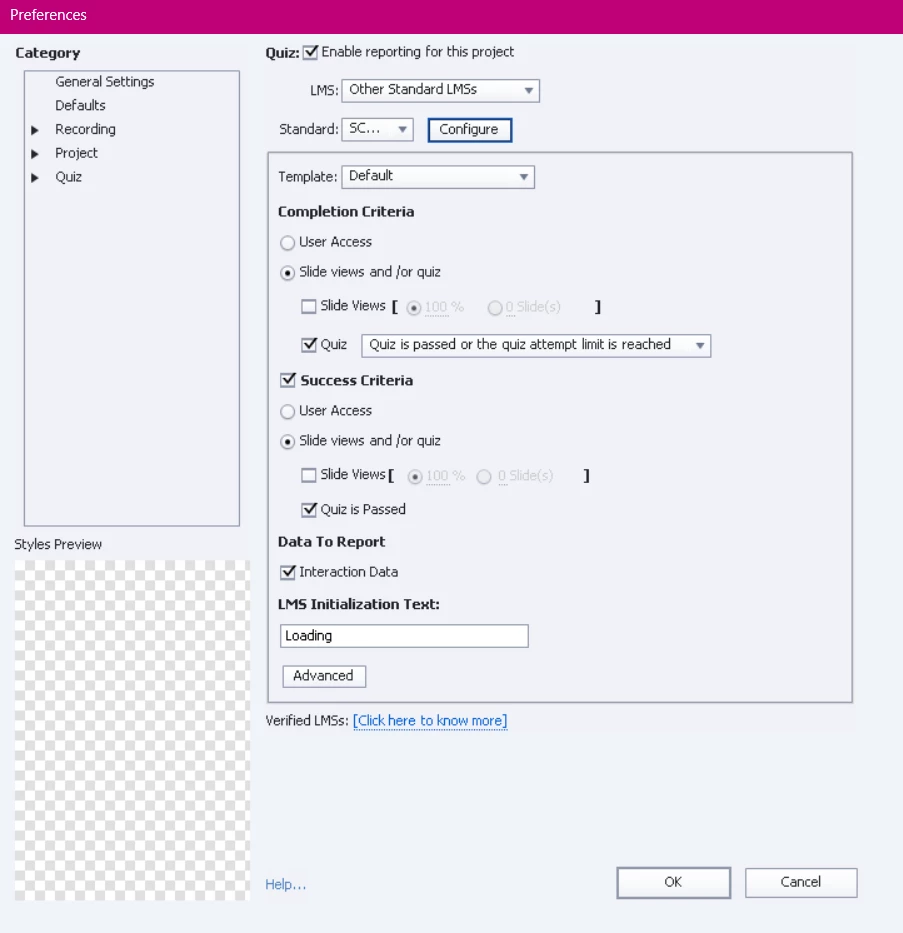
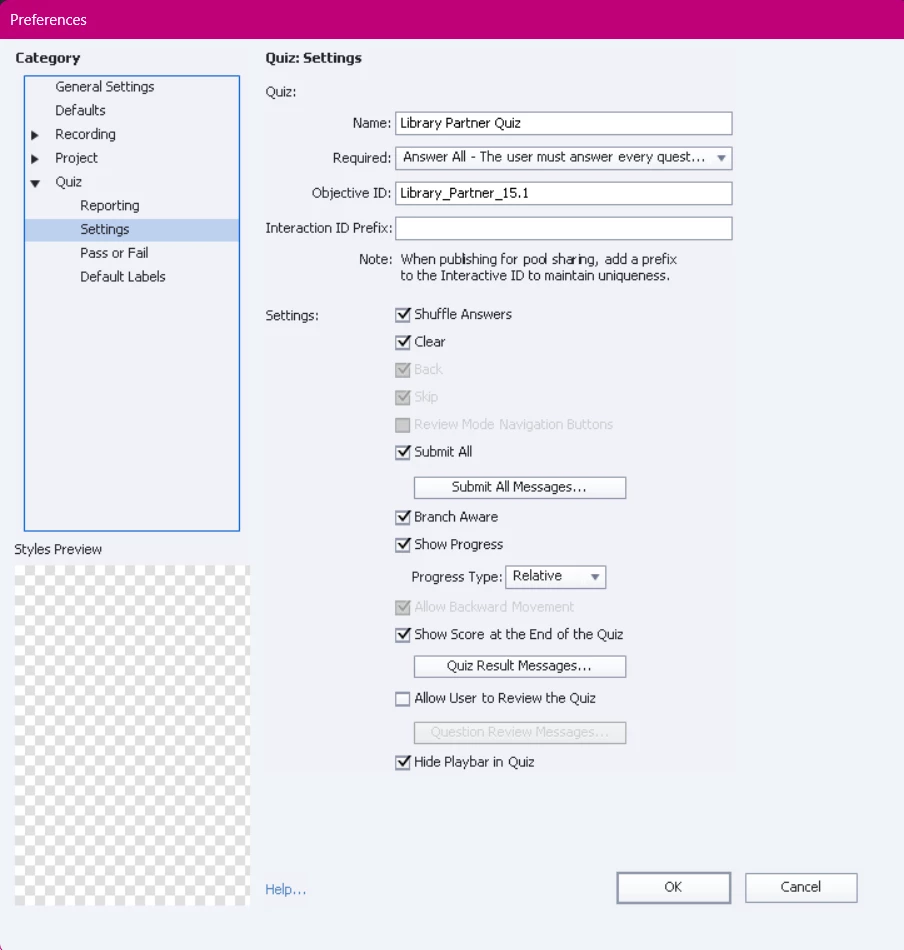
I am using Adobe Captivate 2019 with SCORM 2004, 4th Edition. I've created a quiz allowing users three attempts. During testing, if I found that if I fail the first attempt and attempt to relaunch the test, I am redirected to the score slide from the previous quiz attempt and clicking the "Continue" button does not have any effect. I've replicated this behavior on SCORM Cloud, ruling out any issues with the LMS. Below are snapshots of the quiz settings


What am I doing wrong here?

    This topic has been closed for replies.
    Correct answer RodWard

    I agree with Lieve that it's not a good idea to have both Branch Aware and Submit All turned on at the same time. 


    You would only normally use Branch Aware if you wanted to allow your user to only complete some of the quiz questions or interactions and then be scored ONLY on those they actually visited.  But if your user is going to encounter all quiz questions, then Branch Aware doesn't make sense.  Submit All is only really useful if you want your user to be free to move back and forth during the quiz answering questions and checking their answers carefully before submitting them all at one click of the Submit All button.


    My gut feeling tells me your main issue of being stuck on the Quiz Results slide might be due to something quite simple.  You haven't shown a screenshot of the Quiz settings for Pass/Fail where it gives you the option to allow the user to Retake the Quiz if they fail an attempt.


    If you have Resume Data Bookmarking turned on and you exit the lesson at the end of an unsuccessful attempt (with more attempts still allowed), then the default behaviour of a SCORM module is to take you back to the last slide.  In this case that appears to have been your Quiz Results slide.  So, that seems fairly normal to me.


    However, without that Retake Quiz button your user will not be able to reset the quiz for another attempt when they land on the Quiz Result slide, regardless of how they get there (during the quiz or after resuming from the LMS).  You've given them three possible attempts.  Why not make it possible for them to actually reset and retake the quiz?


    Regarding the non-functioning Continue button: Since you have the Reguired dropdown list set to Answer All, that means if the learner has not visited and answered every question, then the Continue button on the Quiz Result slide will not allow the user to advance further.  That's what I think might be happening.


    So, my suggestion is to set the Retake All button to appear on the Quiz Result slide.  Set the Required dropdown to Optional (yes I know that sounds counter-intuitive but do it anyway).  Turn off Branch Aware unless you are actually offering several different paths to the questions.  Turn off Submit All unless you want the user to have the option to check their answers multiple times before submitting them all.


    See how that goes.

    2 replies

    RodWard
    Community Expert
    RodWardCommunity ExpertCorrect answer
    Community Expert
    November 18, 2023

    I agree with Lieve that it's not a good idea to have both Branch Aware and Submit All turned on at the same time. 


    You would only normally use Branch Aware if you wanted to allow your user to only complete some of the quiz questions or interactions and then be scored ONLY on those they actually visited.  But if your user is going to encounter all quiz questions, then Branch Aware doesn't make sense.  Submit All is only really useful if you want your user to be free to move back and forth during the quiz answering questions and checking their answers carefully before submitting them all at one click of the Submit All button.


    My gut feeling tells me your main issue of being stuck on the Quiz Results slide might be due to something quite simple.  You haven't shown a screenshot of the Quiz settings for Pass/Fail where it gives you the option to allow the user to Retake the Quiz if they fail an attempt.


    If you have Resume Data Bookmarking turned on and you exit the lesson at the end of an unsuccessful attempt (with more attempts still allowed), then the default behaviour of a SCORM module is to take you back to the last slide.  In this case that appears to have been your Quiz Results slide.  So, that seems fairly normal to me.


    However, without that Retake Quiz button your user will not be able to reset the quiz for another attempt when they land on the Quiz Result slide, regardless of how they get there (during the quiz or after resuming from the LMS).  You've given them three possible attempts.  Why not make it possible for them to actually reset and retake the quiz?


    Regarding the non-functioning Continue button: Since you have the Reguired dropdown list set to Answer All, that means if the learner has not visited and answered every question, then the Continue button on the Quiz Result slide will not allow the user to advance further.  That's what I think might be happening.


    So, my suggestion is to set the Retake All button to appear on the Quiz Result slide.  Set the Required dropdown to Optional (yes I know that sounds counter-intuitive but do it anyway).  Turn off Branch Aware unless you are actually offering several different paths to the questions.  Turn off Submit All unless you want the user to have the option to check their answers multiple times before submitting them all.


    See how that goes.

    Inspiring
    November 27, 2023

    HI Rod and Lilybiri,


    Both of you correctly identified the solution: adding the missing "Re-Take Quiz" button to the results slide. Previously, I recall configuring the quiz to allow three attempts per user and just setting up the "Continue" button in the scores slide. Upon clicking "Continue" on the final slide, the SCORM tab would exit. Subsequently, users were required to relaunch the quiz from the LMS to make additional attempts. I have inadvertently enabled/disabled some option that requires users to click the "Re-Take Quiz" button else they stay stuck on the scores slide now. 


    This is what the final slide looks like now:


    Lilybiri
    Legend
    November 27, 2023

    Is this the 'original' Retake button as you find on the quizzing master slide, for which you just edited the label?  Which type of button is it? Only the three old button types can be used on quiz and score slides: this looks like a Transparent button for which you edited the label, the corner and the fill. You cannot use a shape used as button, or you'll lose the embedded functionality.  Can you post a screenshot of the timeline of this score slide? You added one more field (passing score), which should be visible in the timeline. But the other fields and the button should not have an individual timeline.

    Lilybiri
    Legend
    November 17, 2023

    Thanks for the screenshot of the Preferences. I find the setup very weird.

    YOU set 'Required' to 'Answer all' but you have Branch aware  (and Submit All) selected. My intuition tells me that is causing conflicts. Normally 'Submit All' will give you a warning when some questions are not answered when clicking the Submit All button. I would reset the Required field to the 'Optional' default choice.

    But the situation with Branch aware combined with Submit All is one of the rare situations I never encountered. Know that I have solved a lot of problems with quizzes for a client. To me it is an illogical combination. Branch aware is meant to have dynamic quizzing system variables, which will be reset based on the quiz slides visited by the learner. But you also use 'Submit All' which would mean that ALL questions need to be answered, same what you require in the 'Required' field. Hope you understand what I try to explain?

    Inspiring
    November 17, 2023

    I did everything as you suggested but still no go. I just noticed that the "On Exit" dropdown is greyed out. Could this be the problem?


    Lilybiri
    Legend
    November 17, 2023

    What did you 'do'? I suggested to change the Required field, suppose that has been done. But what about the conflict between Branch aware and Submit All? Can you tell what you changed?

    On the screenshot of the Score slide I see that it has been edited, there is a difference with the original master slide in the Blue Veracity theme.  You mentioned that you have 3 attempts on quiz level, but I don't see the Retake button! Quiz Preferences, Pass or Fail: what are the settings there? Normally the Continue button will trigger the Pass/fail actions when the end frame of the score slide is reached.  For that reason you should have at least one slide after the Score slide, which is not the case because the Exit action is dimmed. You cannot have any action if there is no slide after the score slide.


    I have a basic Quiz course online in my blog. Can you have a look at two of the parts:

    https://blog.lilybiri.com/quiz-basics-4-preferences

    https://blog.lilybiri.com/quiz-basics-3-attempts-and-scores