Known Participant
June 11, 2017
Answered

Remember and show the last password

  • June 11, 2017
  • 4 replies
  • 1014 views

Hi,

I made course with several modules.

In the end of each moodule there is a password which unlocks  the next module.

I need the course to remember and show the previous password at the start of next, even if I shut the course.

(becauase without it the learner would start from the start everyy time he´d close program),

but of course the password must be shown only if previous moudule is done!

Is it possible? Or is there eny other suggestion?

Thanks a lot for your time and answer.

Karel

    This topic has been closed for replies.
    Correct answer thisguy4xapi

    First off this was my error as I did the javascript from memory. my apologies  It should be localStorage.setItem() and localStorage.getItem().....sorry that's what I get for trusting my occasionally used code vocabulary from memory

    So here is a working example I put on my server.

    http://caleblinux.duckdns.org/pwexample

    I would be happy to email the captivate source file to you (I use CP 9) if that will help.  Here is a dropbox link to the .cptx file I created this with.

    Dropbox - pwexample .cptx

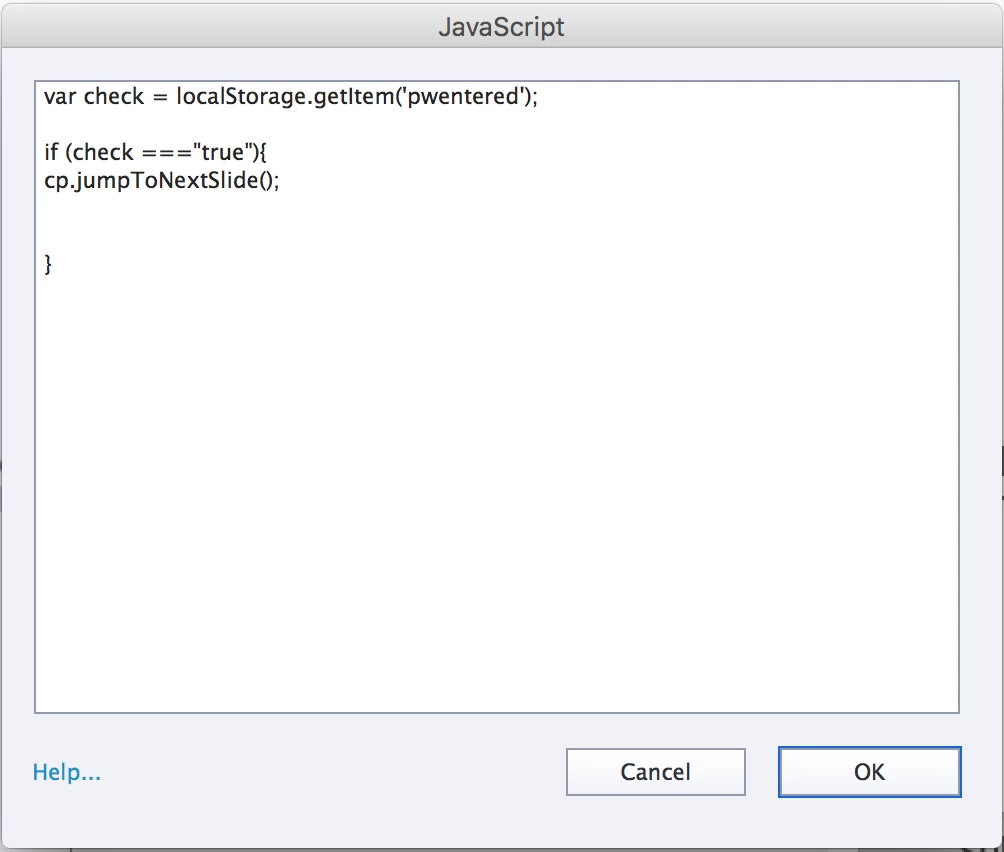
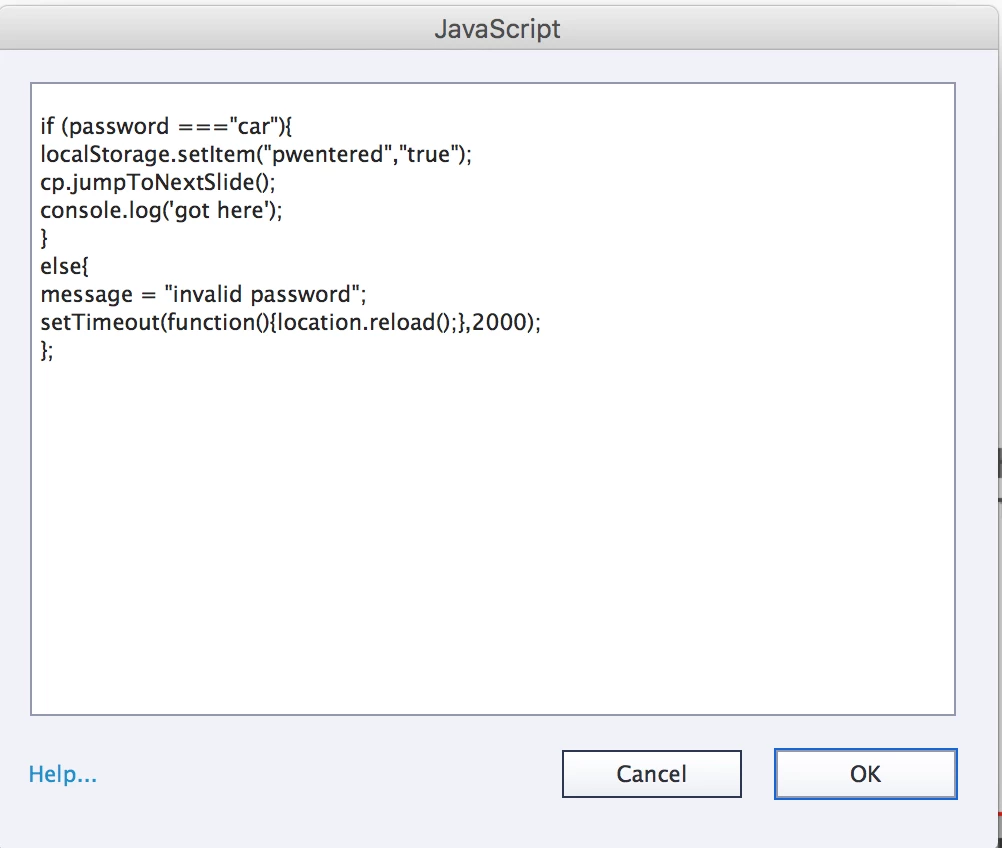
    Here are the 2 javascript window screenshots.

    This executes on entry of password slide

    This is the 2nd javascript window which is attached to text entry box that I have assigned the variable password too

    I added a little extra code here, when the user enters a wrong value I have a screen varaiable (message) that displays invalid entry for 2 seconds and then refreshes the browser for another try at the correct password.

    4 replies

    thisguy4xapi
    thisguy4xapiCorrect answer
    Inspiring
    June 20, 2017

    First off this was my error as I did the javascript from memory. my apologies  It should be localStorage.setItem() and localStorage.getItem().....sorry that's what I get for trusting my occasionally used code vocabulary from memory

    So here is a working example I put on my server.

    http://caleblinux.duckdns.org/pwexample

    I would be happy to email the captivate source file to you (I use CP 9) if that will help.  Here is a dropbox link to the .cptx file I created this with.

    Dropbox - pwexample .cptx

    Here are the 2 javascript window screenshots.

    This executes on entry of password slide

    This is the 2nd javascript window which is attached to text entry box that I have assigned the variable password too

    I added a little extra code here, when the user enters a wrong value I have a screen varaiable (message) that displays invalid entry for 2 seconds and then refreshes the browser for another try at the correct password.

    Known Participant
    June 21, 2017

    Hello Brian,

    you are really great! I have no words to thank you, so sorry for poor: thank you for all.

    I tried your example and it worked (not mine, somewhere is mistake),

    but I will solve this. And of course I can use your examples in my project.

    So we shall see.

    thisguy4xapi
    Inspiring
    June 20, 2017

    Ok assuming that you have moved away from executable and are running from browser here is what you would do.

    You will need to javascript advance actions, one that will set the value when pw has been entered, another that will check that value everytime the user gets to the enter pw slide.

    When you user submits pw and it is correct  you must execute an advanced action javascript window that contains the following.

    setLocalStorage('pwentered','true');  //This is setting the key pwentered to the value of true.

    Now we need CP to check every time the user gets to the pw screen to see if it has already been entered.   So on the entrance action of your pw slide execute this javacscript:

    var check = getLocalStorage(pwentered); //This is getting the value from local storage and assigning it to a variable named check

    if (check === true){

    cp.jumpToNextSlide();} // This is checking if that variable has been set to  true, if it is Cp will jump to the next slide so your user never sees the pw screen again, if it is not true it will not pass the condition check so nothing will happen (requiring your user to enter PW).

    Good luck! - I know this works, I use this exact code in a similar situation to prevent users from having to reenter info everytime they visit a site.

    Brian

    thisguy4xapi
    Inspiring
    June 20, 2017

    One more comment on this method...This assumes that the user would be using the same machine and browser everytime as localStorage is unique to browser and machine.....

    Known Participant
    June 20, 2017

    Hello Brian,

    I appreciate your kindness and stamina…

    I did exactly what you wrote (hope). Password was: car, I used text box, set the password. On success I execute advanced action with javascript and command: setLocalStorage('pwentered','true');

    Then on the pw enterslide I executeed javascript:

    var check = getLocalStorage(pwentered);

    if (check === true){

    cp.jumpToNextSlide();}

      then I published it on my desktop as html5/swf. But after reloding or exiting the programme it remembered nothing at all. Am I dumb or is there anything wrong?

    thisguy4xapi
    Inspiring
    June 14, 2017

    I am afraid my solution will not work for an exectuable, it needs to run in a browser, as the local storage is actually a cache function of the browser.  Not that well versed with exectuables, so I can't offer any other solutions.

    Sorry

    thisguy4xapi
    Inspiring
    June 12, 2017

    How does the user access the course?  LMS, website server?

    You could possibly use local storage, but if each one was a different web page the storage would be exclusive to that page.

    If you want to play with it, try this -

    Execute a javascript window and the line of code is

    setLocalStorage('key','value');

    The key in your case would likely be password and the value would be whatever that password is

    You can then access that by pulling the info back out and assigning to a variable for instance

    var password = getLocalStorage('key');

    You can see these values in the browser by accessing the console.  In chrome local storage values are shown under the Application tab.

    Hope that helps, somewhat vague, but without knowing more about how you are hosting, it is a start.

    Known Participant
    June 13, 2017

    Hello,

    thanks to you, I will try. And sorry I didn´t mention more...

    I published it as executable program (standalone, without posibility to use internet,

    because they could find the answers there).

    Lilybiri
    Legend
    June 14, 2017

    You will need a programmer, maybe publish as an app. Local storage is not a solution IMHO because it is linked with using a browser.