Known Participant
September 13, 2011
Answered

Remember where user left off

  • September 13, 2011
  • 3 replies
  • 2337 views

I noticed several comments in threads related to previous versions of Captivate that it wasn't possible for Captivate to allow a user to remember where they left off in a project and return to that point when they come back to it at a later time. Has this feature been updated at all to be available in the most recent version of Captivate?

Would like to find out a way to do this if possible.

Thanks very much,

Whitney

    This topic has been closed for replies.
    Correct answer RodWard

    It's called bookmarking and there are a number of ways to do it.

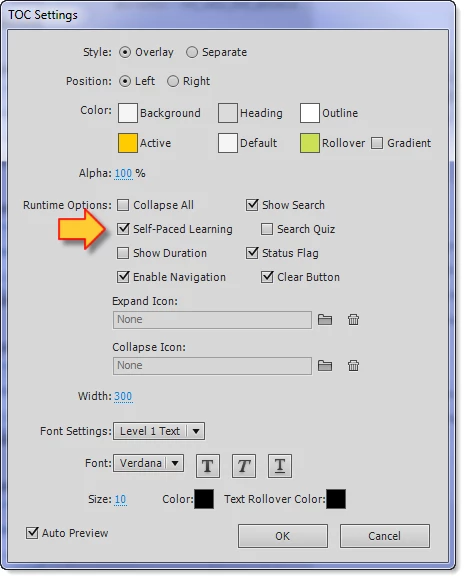
    You can turn on bookmarking by clicking the Self-paced Learning option under TOC settings.

    3 replies

    paula.obrien
    Participating Frequently
    October 29, 2020

    As far as I can tell this was not yet answered from Captivate perspective. I am not using a TOC and in the past the course resumed from where I left off and now it won't. Nothing in our LMS changed and we are NOT under any circumstances allowed to purchase and install a widget. Something in the default settings changed when the flash option was dropped and we are now publishing just to HTML. 

    RodWard
    Community Expert
    Community Expert
    October 29, 2020

    This thread is almost ten years old and you have already mentioned that you have changed over to HTML5.  Please start a new thread and fully describe the issue you are currently facing.

    AndyKingInOC
    Legend
    September 13, 2011

    If you're serving from an LMS there is also a setting in the Reporting Preferences under "LMS Customization" labled "Never Send Resume Data."

    My understanding is that setting is dependant on your LMS, but if it accepts the data, the LMS will restart the learner where they exited the activity last.

    WhitloweAuthor
    Known Participant
    September 13, 2011

    About this LMS customization setting. I assume "never send resume data" should be unchecked if we want the LMS to send information and allow users to pick up where they left off. Is that correct?

    AndyKingInOC
    Legend
    September 15, 2011

    Whitlowe wrote:

    About this LMS customization setting. I assume "never send resume data" should be unchecked if we want the LMS to send information and allow users to pick up where they left off. Is that correct?

    that is correct, but sorry I don't know the answer to the problem you're continuing to have.

    RodWard
    Community Expert
    RodWardCommunity ExpertCorrect answer
    Community Expert
    September 13, 2011

    It's called bookmarking and there are a number of ways to do it.

    You can turn on bookmarking by clicking the Self-paced Learning option under TOC settings.

    WhitloweAuthor
    Known Participant
    September 13, 2011

    Many thanks for the help on that. Also for the helpful suggestion from AndyKingInOC on integrating with an LMS, which is where this is going (Moodle).

    Whitney