
josev6861445
Inspiring
April 12, 2016
Answered

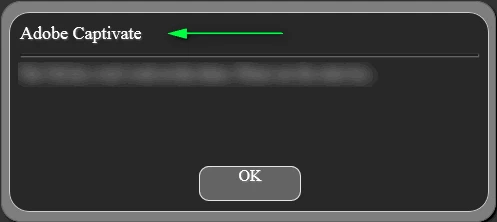
Removing "Adobe Captivate" from an alert box
  • April 12, 2016
  • 2 replies
  • 772 views

Is there any way to remove the "Adobe Captivate" that's listed in this alert box? I can't seem to find any options or workarounds.

This topic has been closed for replies.
Correct answer TLCMediaDesign

If you are publishing to HTML5, In the index.html template file located here: C:\Program Files\Adobe\Adobe Captivate 8 x64\HTML

add the bold text to the function:

cpXHRJSLoader.js(lJSFiles,function()

{

cp.model.data.rtDialog.rtWarningTitle = "Your Title";        

lJSLoaded = true;

constructDIVs();

});

If you are generating the alert, execute the following JavaScript:

cp.alert("message", "title")

2 replies

Participant
February 5, 2018

To make that snippet more reusable between projects, you can use:

cp.model.data.rtDialog.rtWarningTitle = "@MOVIETITLE";

@MOVIETITLE is a placeholder for the project name of your current project. Otherwise, you would have to edit the index.html template to set the title for every project.

You can set that per project in:

File > Publish Settings > Information > Project Name

TLCMediaDesign
TLCMediaDesignCorrect answer
Inspiring
April 12, 2016

If you are publishing to HTML5, In the index.html template file located here: C:\Program Files\Adobe\Adobe Captivate 8 x64\HTML

add the bold text to the function:

cpXHRJSLoader.js(lJSFiles,function()

{

cp.model.data.rtDialog.rtWarningTitle = "Your Title";        

lJSLoaded = true;

constructDIVs();

});

If you are generating the alert, execute the following JavaScript:

cp.alert("message", "title")

josev6861445
Inspiring
April 12, 2016

Many thanks, TLCMediaDesign! This is exactly what I was looking for.