
Known Participant
July 24, 2016
Answered

Removing Hint from all Slides in Training Mode

  • July 24, 2016
  • 1 reply
  • 403 views

Hi I want recorded some software simulations in training and assessment modes.

Now I will make some edits to the training mode, and also want the same edits to appear in the assessment mode.

So my question is: how to remove hint from all slides in the training mode?

I saw a blog post talking about it, but unfortunately the video could not be found.
Reduce your editing hours!! Create training & assessment modules from one Captivate project « Rapid eLearning | Adobe C…

This topic has been closed for replies.
Correct answer Captiv8r

Hi there

Try this.

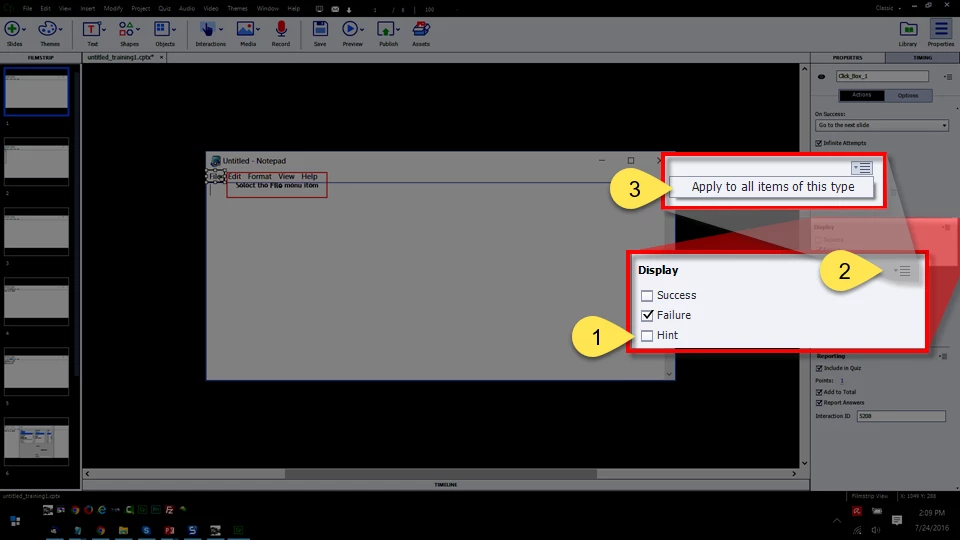
Look at the Properties and clear the option for the Hint caption.

Click the drop-down.

Choose, Apply to all items of this type.

Cheers... Rick

1 reply

Captiv8r
Captiv8rCorrect answer
Legend
July 24, 2016

Hi there

Try this.

Look at the Properties and clear the option for the Hint caption.

Click the drop-down.

Choose, Apply to all items of this type.

Cheers... Rick

Known Participant
July 27, 2016

Thank you very much. It works.