
Replaying slide doesn't reset object show/hide status
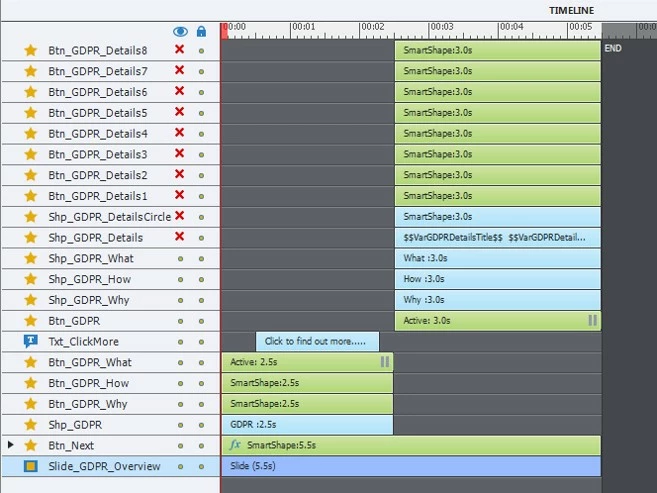
I have a slide which works in two parts (see image below to identify the objects):
1) A first graphic menu is shown (using shapes as buttons) and whenever one of the three buttons (Btn_GDPR_What, Btn_GDPR_How or Btn_GDPR_Why)
is clicked, it calls an Advanced Action which shows some objects that are hidden by default (Shp_GDPR_What, Shp_GDPR_How or Shp_GDPR_Why,
according to the selected button).
2) This works fine and the learner can then select one of the Btn_GDPR_Detailsx buttons to display various information (they update variables that
are shown in the Shp_GDPR_Details box).
3) When the learner clicks on Btn_GDPR, it moves to the start of the slide to run the process over again.
Problem is the following:
The object that had been made visible in step (1) is still visible, even if another button is selected. It's as if restarting the slide didn't reset the objects
on it to their initial state (shown or hidden). In the Advanced Action attached to Btn_GDPR, I tried restarting the slide both by assigning cpInfoCurrentSlide -1 to cpCmdGotoSlide and also by using a Goto Previous slide command with a dummy slide before this one. Both restart the slide, but in both cases the objects' visibility status doesn't seem to have been reset to their original values.
I thought this may be a timeline issue and tried the having Shp_GDPR_What, Shp_GDPR_How and Shp_GDPR_Why objects starting at 0 and running to the end of the timeline, but this makes no difference.
Any insights would be more than welcome.


 AdChoices