xtd8865
Known Participant
December 28, 2017
Answered

Reporting Page

  • December 28, 2017
  • 1 reply
  • 348 views

I have been following some youtube tutorials, in some of them the last page of a quiz is a summary page where it displays the final score for the quiz.

I can't seem to be able to produce it. For example, i created one slide which is a drag and drop interaction:

- I enabled reporting (although I'm just previewing it in internal Captivate preview/web scorm preview)

- ticked Include in a quiz

- ticked Add to total

- ticked Report Answers

But after I submit the answer, the Success or Failure box appears and that's it.

Thank you.

This topic has been closed for replies.
Correct answer Lilybiri

Oh those hyped video tutorials, that never seem to explain everything.

The result slide is automatically added whenever you create default quiz slides with the menu option Quiz, Question slide.

Drag&Drop is NOT a default quiz slide, it is sort of a hybrid feature, that can be used as a question slide but doesn't have all the features of the normal question slides based on the quizzing master slides. For such a slide the Score/result slide is not automatically added to the project. Same would be the case if you insert scored objects (buttons, click boxes, Text Entry Boxes) which you can also add to the Quiz total.

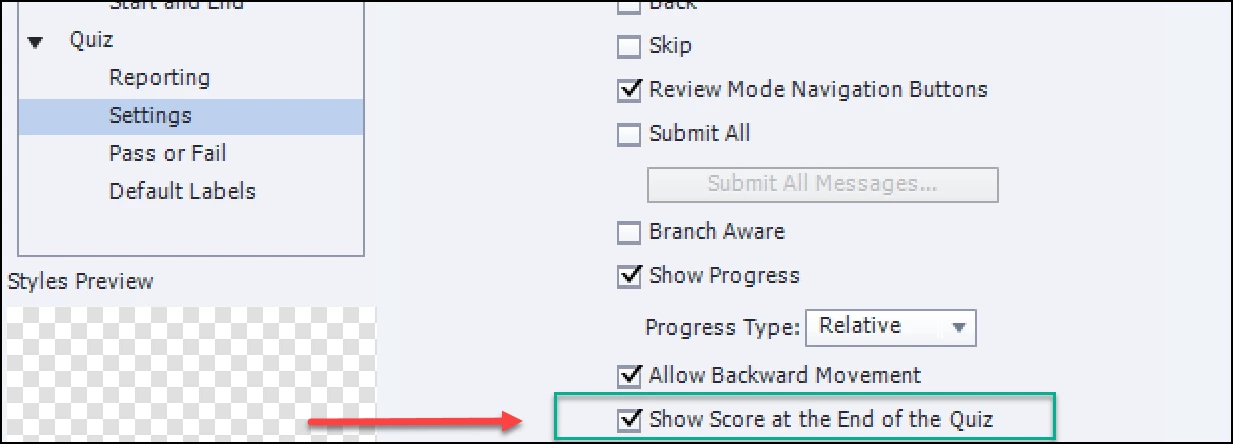
How to add a score slide in those cases:

  • Open Quiz, Quiz Preferences
  • Go to Settings,
  • Check the option Show Score...

1 reply

Lilybiri
LilybiriCorrect answer
Legend
December 28, 2017

Oh those hyped video tutorials, that never seem to explain everything.

The result slide is automatically added whenever you create default quiz slides with the menu option Quiz, Question slide.

Drag&Drop is NOT a default quiz slide, it is sort of a hybrid feature, that can be used as a question slide but doesn't have all the features of the normal question slides based on the quizzing master slides. For such a slide the Score/result slide is not automatically added to the project. Same would be the case if you insert scored objects (buttons, click boxes, Text Entry Boxes) which you can also add to the Quiz total.

How to add a score slide in those cases:

  • Open Quiz, Quiz Preferences
  • Go to Settings,
  • Check the option Show Score...

xtd8865
xtd8865Author
Known Participant
December 28, 2017

Thank you for the explanation.

Lilybiri
Legend
December 28, 2017

You're welcome. Enjoy Captivate.