Devonuk
Known Participant
August 9, 2011
Answered

Reset a quiz in Captivate 5

  • August 9, 2011
  • 2 replies
  • 6810 views

Hello

I have a graded quiz on my course with 8 questions if the user wants to retake the quiz, they can't because they see their previous answers.

How do I reset the quiz

Senario

User takes quiz

Views score . . but not happy

User uses rewind to retake quiz

Quiz buttons greyed out

Page needs to be reset so quiz can be taken again

Ken

This topic has been closed for replies.
Correct answer Lilybiri

Hi Ken,

Using the playbar is not the way to go, I even will always turn off the playbar for quiz slides.

You have to allow multiple attempts on Quiz level. See screenshot: here I allow 3 attempts and activated the Retake button. This retake button is resetting the quiz but it appears on the Score slide.
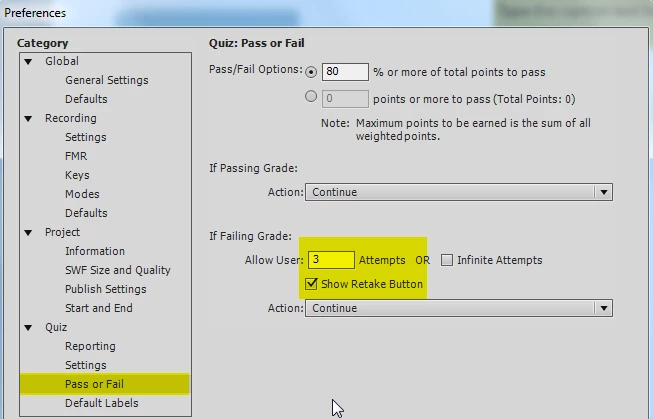
This is why I talked in my previous answer about the 2 levels. The attempts set for a Question slide (in its Quiz Properties panel) will indeed have to be exhausted before leaving that question slide. With the attempts on Quiz level, you'll have the work flow you described. And really, turn of the playbar by assigning the value 0 to the system variable cpCmndShowPlaybar on entering the first question slide, and assign the value 1 on entering the first slide after the score slide. Because going back or rewinding with the playbar will not reset the quiz.

Lilybiri

2 replies

Known Participant
August 29, 2011

I have a related problem. I want the user to be able to review and then retake. Sadly, if you review your first attempt, when you arrive at the results page AFTER the review the retake button is gone and the quiz is not resettable. Any ideas?

Lilybiri
Legend
August 29, 2011

This is the logic of Captivate Quizzes: since the Review shows the correct answers, what is the use of having another Quiz attempt?

So, either you use the Succes/Failure captions to give an immediate feedback on each question slide and allow the user multiple attempts on Quiz level, without Review, or you'll have to create custom questions.

Lilybiri

Known Participant
August 29, 2011

There are many learning situations where exactly that kind of structure is useful and productive and there is nothing illogical about it from a teaching perspective. Additionally, if I am using a large pool of questions to draw my quiz from, there is a very strong reason to be able to retake after review, as it's entirely possible that the student will get a whole new set of questions. I did find an answer that doesn't confuse the learner in terms of navigation on a different forum post. Put the retake button on top of the review button and the learner will only see it at the first failure. This does not fix the poor design of the tool, but it does keep the learner from being bewildered about where the retake button went after reviewing their first attempt.

Lilybiri
Legend
August 9, 2011

Hello,

You have to allow multiple attempts on Quiz level, in the Quiz Preferences, Pass or Fail. But since you have a Retake button, I suppose this has been setup correctly? When clicking the Retake button all answers, even the correct ones, will be cleared. So I think that is what you mean by Reset.

Do you allow Review?  Because if the user reviews the quiz, he will not be able to retake it anymore, that is the logic of the Captivate Quizzes.

Lilybiri

Devonuk
DevonukAuthor
Known Participant
August 9, 2011

Hello Lilybiri

I dont have a retake button and cant find one.  I have a rewind button which is standard on the captivate toolbar that sits at the bottom of the screen when you run the programe.  Clicking that starts the course from page 1.  But the quiz has retained the answers from the first attempt.  How do I clear this so they can take the quiz again.

If someone reaches the end of the course and hasn't passed I want them to be able to go back and take the quiz again. However I dont want them to be able to sit on a quiz page and keep clicking the questions until they get a right answer.

Ken

Lilybiri
LilybiriCorrect answer
Legend
August 9, 2011

Hi Ken,

Using the playbar is not the way to go, I even will always turn off the playbar for quiz slides.

You have to allow multiple attempts on Quiz level. See screenshot: here I allow 3 attempts and activated the Retake button. This retake button is resetting the quiz but it appears on the Score slide.

This is why I talked in my previous answer about the 2 levels. The attempts set for a Question slide (in its Quiz Properties panel) will indeed have to be exhausted before leaving that question slide. With the attempts on Quiz level, you'll have the work flow you described. And really, turn of the playbar by assigning the value 0 to the system variable cpCmndShowPlaybar on entering the first question slide, and assign the value 1 on entering the first slide after the score slide. Because going back or rewinding with the playbar will not reset the quiz.

Lilybiri