
Participant
November 30, 2018
Question

Reset Button Margins

  • November 30, 2018
  • 1 reply
  • 153 views

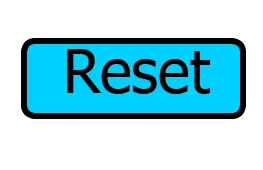
Is there a way to affect the margins of the reset button? I attached an image below. But basically, I want the text centered within the box, but it appears that margin spacing is set causing the text to be aligned at the top. Is there a way to override that?
    This topic has been closed for replies.

    1 reply

    Lilybiri
    Legend
    November 30, 2018

    Which type of button is this?  Is it on the Quiz slides or on the D&D slide?

    Moreover, not sure this is top aligned. Remember that there are also characters like g, j, which need space down.

    Participant
    November 30, 2018

    It is the reset button on a Drag & Drop slide. Any insight you provide is appreciated!

    Lilybiri
    Legend
    November 30, 2018

    This button is using the Default Quiz Button Style.  I suspect you are using a custom theme, because I never did see the label in such big font size in the Themes packaged with Captivate.

    That button is probably a Transparent button. Can you check?  They do not have the functionality of setting margins like is possible for shape buttons. I can only recommend to try out a different font size. Check the style in the Object Style Manager.