


FrancoisK
Known Participant
October 26, 2021
Question

Reset dragged items when attempts are depleted?

  • October 26, 2021
  • 4 replies
  • 333 views

Good day Captivate Users


Is it possible to have dragged objects reset/return to their original position on the slide, if a learner depletes the number of attempts given? 


I have a D&D interaction with 2 attempts, not set to report as part of quiz, created from scratch;
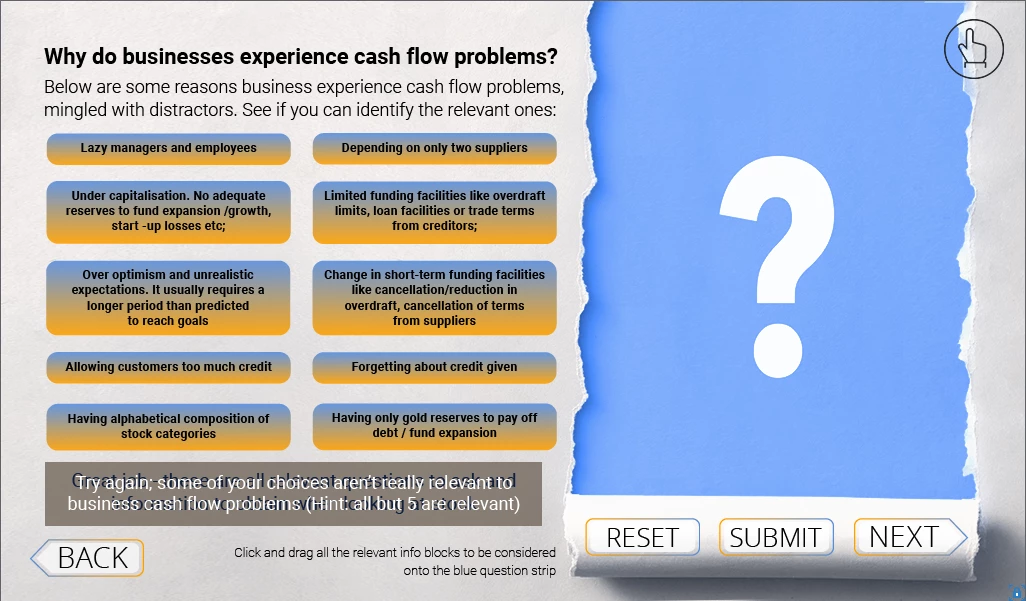


I have also enabled the "reset" option, and it works fine after the first failed attempt - HOWEVER, after the second attempt, the dragged items remain on the drop target, instead of returning to their original position.


I have created shapes to show which of the dragged items are correct, and made an "on failure" action set to show them, but because the dragged items do not return to their starting position, some of the shapes now highlight blank space:
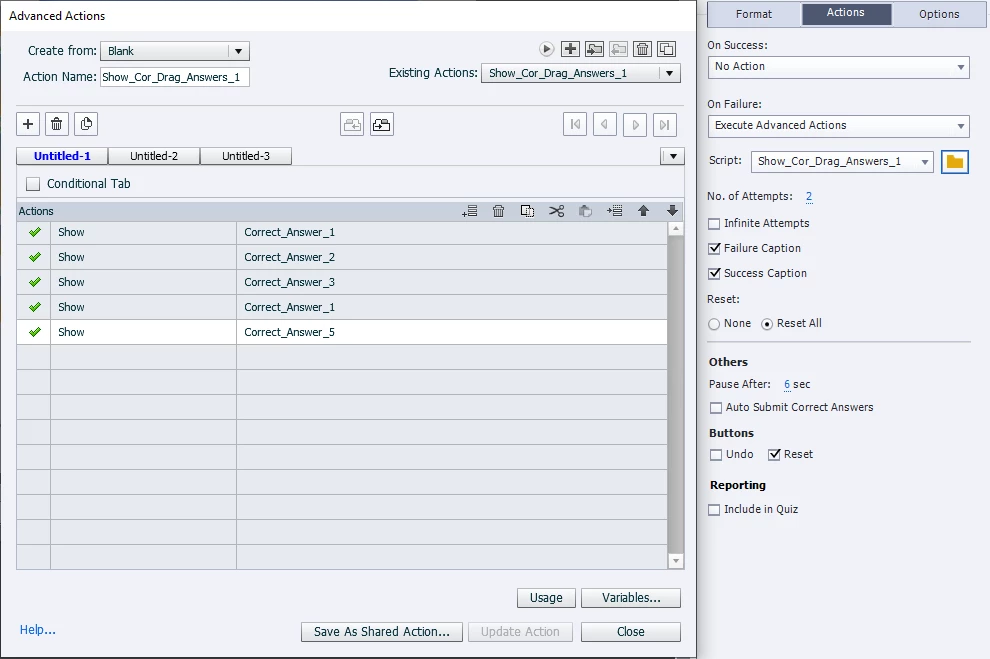
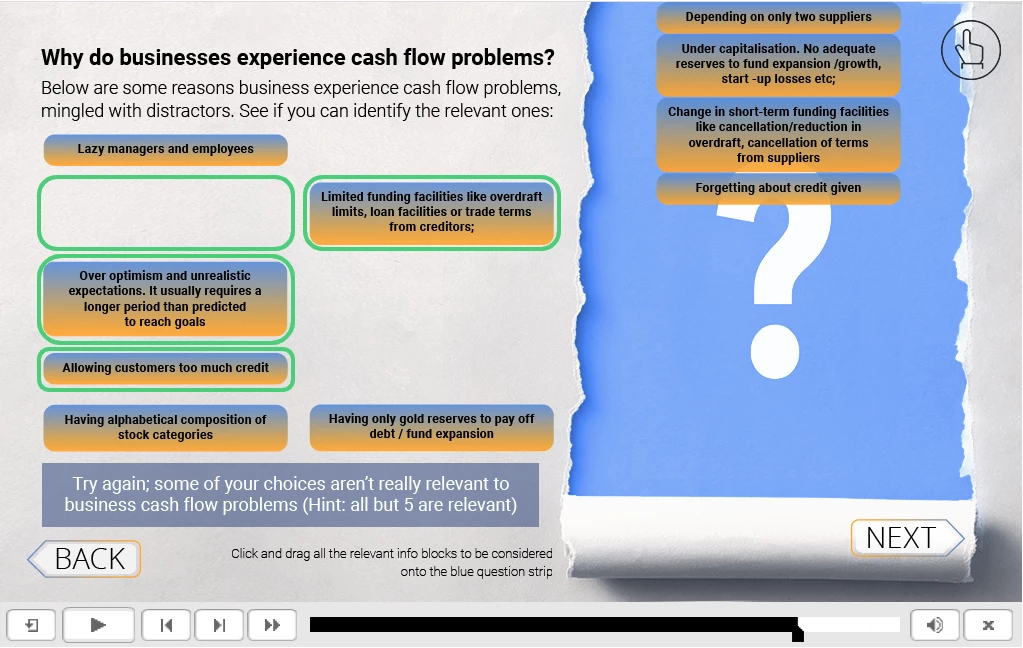


I am wondering whether some conditional action needs to be written, only showing the highlight shapes for the correct items NOT DRAGGED, so reading which ones were correctly dragged, ignoring their shapes, and seeing which correct items remain undragged, and only revealing their shapes, showing which ones the user missed?


Is this possible? Or is there a different way to approach this?


P.S: I'd also like to add a custom message telling the user that the correct answers are indicated, instead of

re-showing the failure message a second time?


Appreciate the help!

    This topic has been closed for replies.

    4 replies

    TLCMediaDesign
    Inspiring
    October 26, 2021

    Take a screen grab of the correct answers, place it directly on top. Incude the draggable objects and the targets. Show that image when attempts have been reached.

    Inspiring
    October 26, 2021

    I understand after unsuccessful second attemt you want all drag sources to return to their original position (regardless if dropped correctly before or not) AND you want the interaction to be frozen then, as all allowed attempts are used up. If I misunderstood you, please ignore this. 

    As mentioned by Lilybiri and Rod, it is possible to reset the interaction by re-entering the slide, but that would also reset the number of attempts.

    How about faking the whole thing by having the D&D's failure action route to some slide that just shows the initial setup of the drag'n drop interaction as static, non-interactive slide? The items wouldn't animate back to their original position but appear to jump there instantaneously of course.

    FrancoisK
    FrancoisKAuthor
    Known Participant
    October 26, 2021

    That is correct @Gaanf , I wanted the dragged items to reset after the 2 attempts, so as to be in starting position when the correct indicator shapes appear, to indicate to the user which were the correct answers after they had tried and failed.


    If I understand correctly, using the "on enter" action to reset the slide, will return the drag items to their original positions, but I won't be able to use the correct shapes to show the right answers, since the whole slide is being reset, and running the show action along with the "on enter" one will show the user the correct answers before they even start the exersize, each time they enter the slide?


    Perhaps then jumping to a still slide with all the elements in original position will be the easiest solution in this case then.. It is a pity there is no way of writing an advanced action which uses the same coding as that of the "reset all" option in a D&D slide? 

    Lilybiri
    Legend
    October 26, 2021

    You don't need a Reset action at all, just re-entering the slide will do the trick. But I see that you didn't read my answer, or have a look at the blog where I described how to re-enter the slide. 

    Your choice, there are always different ways to solve a problem, not all are as simple as the one I described.

    RodWard
    Community Expert
    Community Expert
    October 26, 2021

    Since this drag and drop interaction is not reporting to the quiz, the drag objects and attempts will reset if you leave and reenter the slide again.  However, that doesn't solve your problem of wanting to limit the number of attempts to two.  As well as reentering the slide, you would also need to prevent the learner from being able to interact with the drag objects to move them again when the slide resets.

    FrancoisK
    FrancoisKAuthor
    Known Participant
    October 26, 2021

    Sorry about the big gaps in info...

    Lilybiri
    Legend
    October 26, 2021

    Not sure to have answers to all your questions, but will give it a try.

    That slide is not included in the quiz but set up as a Knowledge Check slide. Such a slide is automatically reset when you leave the slide and revisit it. A possibility is to reset the slide with the workflow I described in:

    http://blog.lilybiri.com/replay-or-reset-slide

    or if you prefer a Captivate tutorial:

    http://blog.lilybiri.com/replay-slash-reset-slide-2-captivate-tutorial

    I also treated this topic in my recent workshop in the Adobe World eLearning conference. You can find all the recordings in the eLearning community.

    You can use the On Enter action of that slide (on revisit) to show answers the way you started it. However the correctly dragged drag sources will have disappeared. Maybe this blog will offer some ideas, although it was created for a scored D&D slide during review:

    http://blog.lilybiri.com/create-review-state-for-scored-drag-and-drop-slide