Participant
August 10, 2011
Answered

Resize run-time window

  • August 10, 2011
  • 2 replies
  • 1297 views

Hi,

  how can I publish so that the size of the movie follows the available size of the web reader window?

Also including manual resizing done by the user.

I have used Captivate for several years but always encapsulated the material in another tool, which do handle the rezise.

I got one tip to change the fixed size described in the .htm to

SWFObject("CustomerJourney.swf","Captivate", "100%", "100%", "10", "#CCCCCC");

but nothing happened in IE nor in Chrome ..

I can not find any parameters anywhere on how to do this.

BR Pär
This topic has been closed for replies.
Correct answer Lilybiri

Hello,

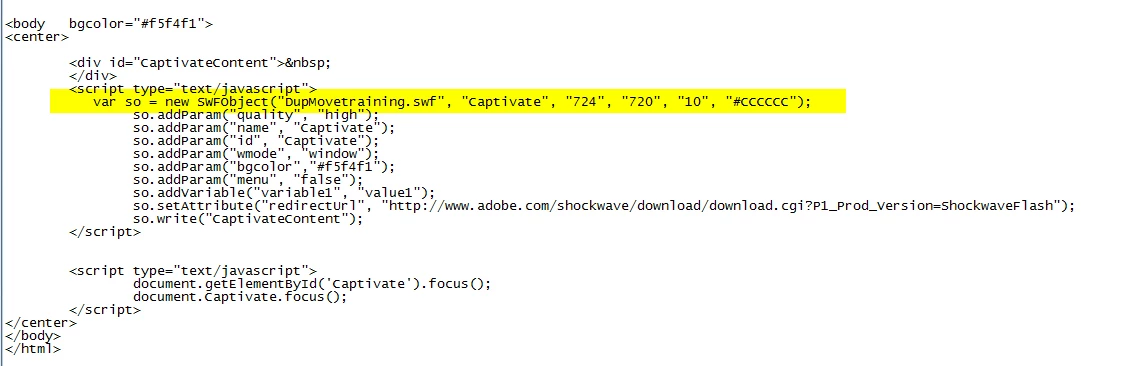
You'll find this in the companion HTML-file that is created when you publish to Flash. Here is an example of part of such a file, that normally is set to the resolution in pixels of the CP-project:

Lilybiri

2 replies

ParLjuAuthor
Participant
January 10, 2012

Just add a bit of additional info. Locally (own computer) this did not work but after upload to webserver the resized worked as expected.

Known Participant
September 13, 2012

Hi Lilybiri

same problem with captivate 5. No resize. Also tried to replace fixed size with 100%, but no resize after upload to an LMS.

Does anybody know, if there isn't an easier way? Is there an export function in captivate to set the window to resize (As in Flash)?

Thank you!

Lilybiri
LilybiriCorrect answer
Legend
August 10, 2011

Hello,

You'll find this in the companion HTML-file that is created when you publish to Flash. Here is an example of part of such a file, that normally is set to the resolution in pixels of the CP-project:

Lilybiri

ParLjuAuthor
Participant
August 11, 2011

Hi Lilybiri,

  exactly, and I have even changed the default .hmt-file with 100% .. but it does not do anything at all in the runtime window. Tried Chrome, IE and firefox but no resize. In my testfile I have the following command:

  var so = new SWFObject("00 - basbilder - grund 08-07.swf", "Captivate", "100%", "100%", "10", "#CCCCCC");

any other ideas of what I should try?