Known Participant
March 3, 2014
Question

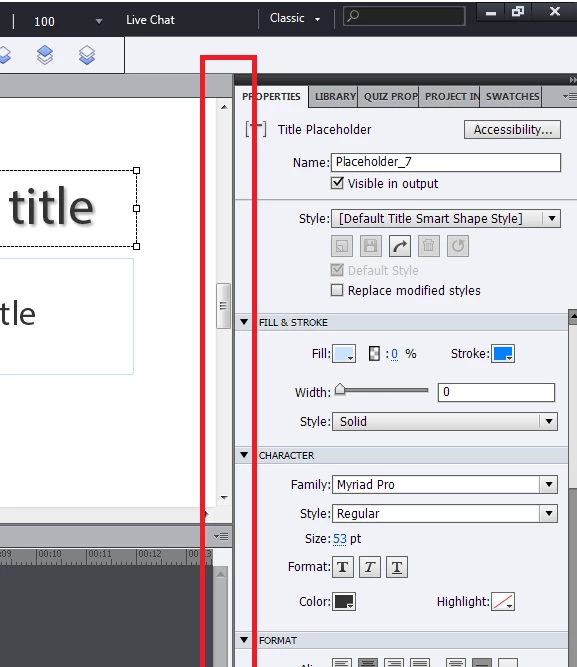
Resizing panels on the right side? [Captivate 7]

  • March 3, 2014
  • 1 reply
  • 905 views

I'm pretty sure I remember being able to drag the panels to resize them in Captivate 6. For example, if you hover your mouse over the line between the timeline and the project aea, you can drag it to make it smaller or bigger. Similarly, wasn't I able to do this between the project area and the panels on the right side, that contains the properties panel, library, project info, etc? It's letting me minimize or open it, but not resize it in Captivate 7.
This topic has been closed for replies.

1 reply

Lilybiri
Legend
March 4, 2014

Think you are right (didn't even see it before), but the resizing possbility was very limited in 6, to the maximum size of the Properties panel only. When you make panels floating, some can still have their width being increased like the Library (which I often make floating).  As I answered in many threads, the only way to increase width of the Properties panel is to drag it to the bottom dock, where the Timeline is sitting.

I have already logged multiple feature requests to allow more customisation for panel size, to turn the Advanced Actions dialog box into a real panel, with full customisation possible etc. You can only add your voice by entering also a feature request.

jeigh
Participant
September 11, 2014

I can't change fonts because of this.

Lilybiri
Legend
September 11, 2014

You cannot resize this panel beyond its maximum width. My workaround is to

drag that panel to the bottom dock, it will adapt to its width. And this was also the same answer I already posted. Why didn't you try it, it was in the same thread?