Participant
June 13, 2012
Answered

Responses showing over feedback in sequence question - Captivate 5

  • June 13, 2012
  • 1 reply
  • 641 views

Hi all

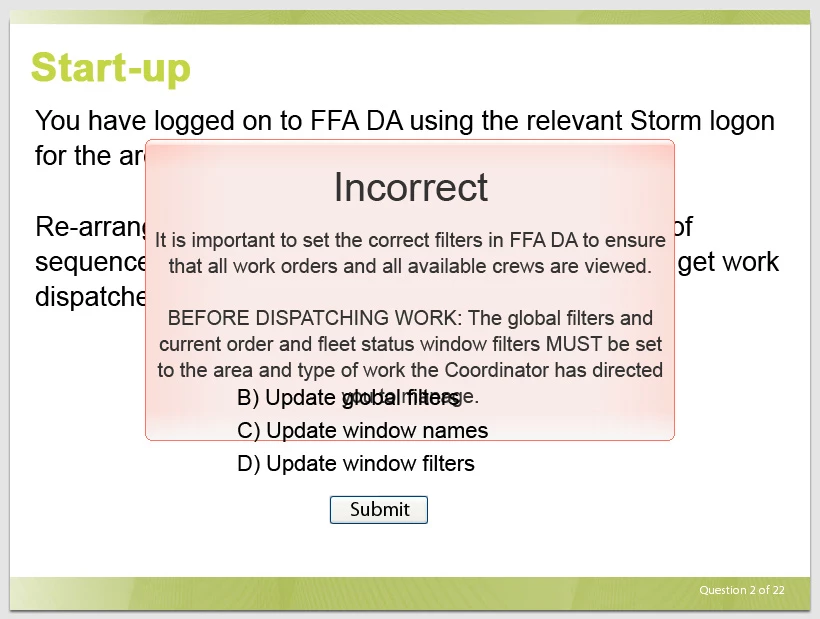
I have an issue with the sequence question type. If you have feedback, the draggable responses show over the top.  Please see grab.

Is this a bug? I can't find any mention of it. It only seems to do it with certain responses. Makes it completely unusable.

Suggestions?

Mitch

This topic has been closed for replies.
Correct answer RodWard

This tends to happen if you add answer options AFTER creating the question and adding the feedback captions.  The last thing added ends up on the upper layers of the quiz question slide, but since you cannot see these layers in the timeline, as you can for other slides, you cannot reorder the layers by normal means.

The solution is to turn your feedback captions off and then on again so that they then end up on the higher layers again.

Go to Quiz Properties for this slide and deselect/select the Correct and Incomplete captions to put them above the answer options.  Then set Failure level to NONE and back to whatever it was before to set the Failure caption above everything else.  This will erase any text you had in the captions, so if you've invested quite a lot of time adding text to these feedback captions, it's a good idea to copy that text somewhere else first, so that you can just paste it back in after recycling them.
1 reply

RodWard
Community Expert
RodWardCommunity ExpertCorrect answer
Community Expert
June 13, 2012

This tends to happen if you add answer options AFTER creating the question and adding the feedback captions.  The last thing added ends up on the upper layers of the quiz question slide, but since you cannot see these layers in the timeline, as you can for other slides, you cannot reorder the layers by normal means.

The solution is to turn your feedback captions off and then on again so that they then end up on the higher layers again.

Go to Quiz Properties for this slide and deselect/select the Correct and Incomplete captions to put them above the answer options.  Then set Failure level to NONE and back to whatever it was before to set the Failure caption above everything else.  This will erase any text you had in the captions, so if you've invested quite a lot of time adding text to these feedback captions, it's a good idea to copy that text somewhere else first, so that you can just paste it back in after recycling them.

7zark71Author
Participant
June 13, 2012

Thanks Rod..all sorted..