
Known Participant
June 5, 2019
Question

Responsive e-learning question

  • June 5, 2019
  • 1 reply
  • 140 views

Hi guys,

Just a question if I may...

I am building a responsive e-learning module and I have encountered this minor problem when I publish.

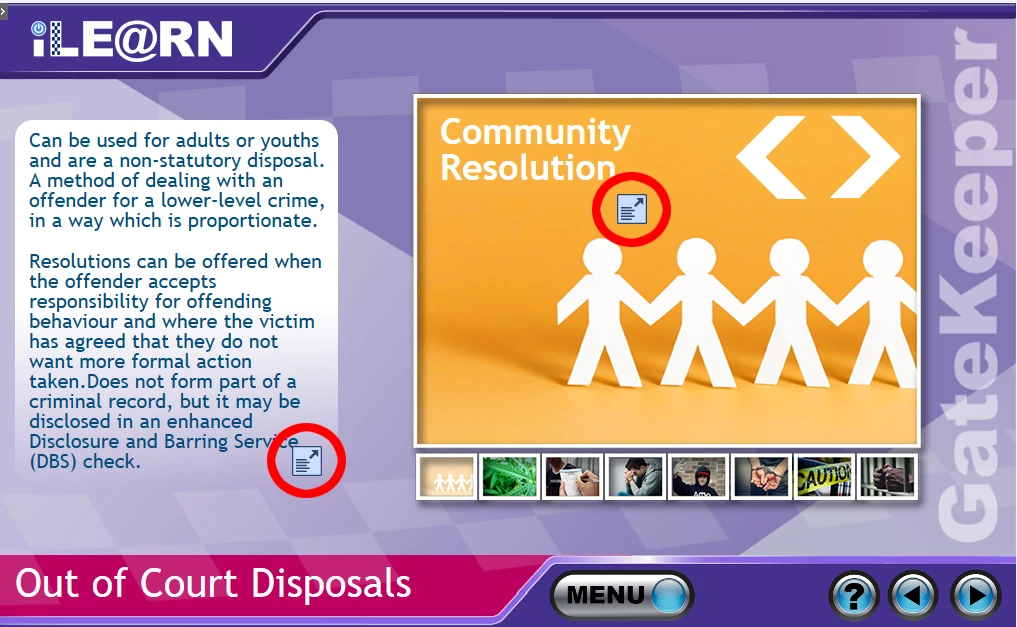
I have attached an image to show you what I mean. Now my question is, how do I get rid of these symbols

(highlighted in RED)?

I know when you click these, you see a large version of the text appear that fills the screen for the benefit of mobile devices,

BUT, I just want to remove these.

Thanks in advance
    This topic has been closed for replies.

    1 reply

    Lilybiri
    Legend
    June 5, 2019

    You cannot get rid of them, those are the expand buttons which appear when the text doesn't fit anymore in the text container. Clicking that button will open the full text in a popup.

    Only way to avoid it: less text, smaller font size. Since I don't know which workflow you use, Brekapoints of Fluid Boxes cannot give more details.

    keith888Author
    Known Participant
    June 5, 2019

    Hi,

    Someone has found the solution and it is under this thread!:-

    how to remove the Expand icon in Captivate 9?