perfect_Hero5023
Known Participant
September 23, 2016
Question

Responsive or scalable HTML5 image blurriness

  • September 23, 2016
  • 1 reply
  • 539 views

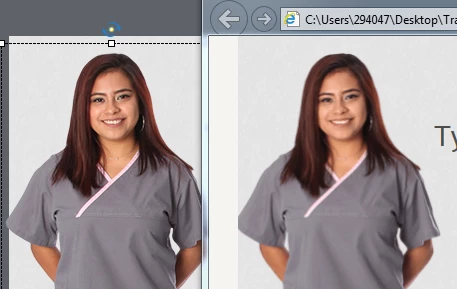
I was hoping to use a responsive project for my upcoming project, but I'm finding that images and screenshots are fuzzy when published. In the image I've posted, you can see that the image I've inserted is clear when viewed in Captivate (left) and that it becomes fuzzy when the published version is viewed in an internet browser window (right). In my publish settings, under Size and Quality, I have JPEG set to 100%. I'm getting the same blurriness when using a scalable HTML5 project.

Has anyone found a solution?

If the fuzziness cannot be corrected, responsive projects and publishing scalable HTML5 files are useless features to me. In past projects where I've used responsive projects, learners complained that they felt like their eye glass prescription was wrong.
    This topic has been closed for replies.

    1 reply

    RodWard
    Community Expert
    Community Expert
    September 23, 2016

    You've discovered just one of a number of disadvantages to using Responsive output.

    Images always appear at their best when NOT resized or rescaled in any way.  However, responsive projects are intended to display the same content at drastically different resolutions by using breakpoints.  If you just use the same image for all breakpoints, the result is what you show above.  It will only look good when one of those breakpoints is displaying the image at exactly 100%.

    In order to have any chance of keeping the sharpness in your images with Responsive projects you would need to have a differently sized version of each image in your project for each breakpoint.  So if you are using Captivate 9, you would need 5 different versions of each image.  Each image version would be resized in PhotoShop or some other similar editing tool so that it is as crisp and sharp as possible at the specific size required for a given breakpoint.

    Lilybiri
    Legend
    September 23, 2016

    To add to Rod's comment, moreover in between the breakpoint views the images will be resized if they are set up in %, which means always decrease in quality. The only other recommendation I could offer is to try to use SVG images whenever possible to replace bitmap images. Those characters in the Assets are bitmap images.