
Participating Frequently
September 13, 2016
Question

responsive project and learning interactions - text scaling and wrapping help

  • September 13, 2016
  • 1 reply
  • 423 views

Hey everyone, I'm working on a responsive project using the 3 default breakpoints. I'm hitting a wall with the Checkbox learning interaction (LI).

It isn't wrapping text or scaling text if the text is too long to be displayed at that screen size. It just gets cut off.

Mobile breakpoint example:
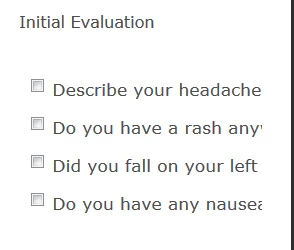
If you change the LI font size in any of the 3 views, that font size is applied to all of them. So if I set a tiny font so the whole line appears on mobile, the tiny font is used at desktop size.

I don't have the 'Scale Text' option in the LI config that some other posts have talked about.

In general, I've found the Responsive process rather unintuitive and difficult to use, but I've figured out how to work around pretty much everything but this.

This topic has been closed for replies.

1 reply

Lilybiri
Legend
September 13, 2016

Not all learning interactions have the option 'Rescale', are not really

suited for responsive projects IMO. Sorry, wished this very useful one

would be upgraded.

On Tuesday, 13 September 2016, hayleyk5460387 <forums_noreply@adobe.com>

Participating Frequently
September 13, 2016

The Learning Interactions are just so broken in HTML5. I just tried a test in a non-responsive HTML5 project and my text gets cut off just the same. I wish there was some fix - it looks fine on the stage, but breaks in the browser.

RodWard
Community Expert
Community Expert
September 14, 2016

To be fair, since you mention that you are using a Captivate version with only three breakpoints I would surmise you are still using Captivate 8, is that correct? 

If your development focus is going to be on the cutting edge with HTML5 responsive design then I would suggest you REALLY need to be on the very latest version of Captivate, not several updates behind.

The Learning Interactions and other HTML5 functionality of Captivate is a work in progress, and I doubt Adobe is willing to go back and fix older versions when their main focus now is probably on the next version of Captivate to come out.