
Known Participant
July 16, 2018
Answered

Responsive Project: Jigsaw Puzzle

  • July 16, 2018
  • 1 reply
  • 1104 views

Hello,

I created a game using "Responsive Project" in Captivate 9 and added the jigsaw puzzle interaction.  It’s posted to a website designed in Dreamweaver. It works fine on a desktop computer but not IPhones. When dragging the pieces below about the halfway point on the screen, the pieces disappear. There isn't anything layered on top of the puzzle widget in the Timeline, and I didn’t resize the widget.

Thanks for your help! Jen
    This topic has been closed for replies.
    Correct answer RodWard

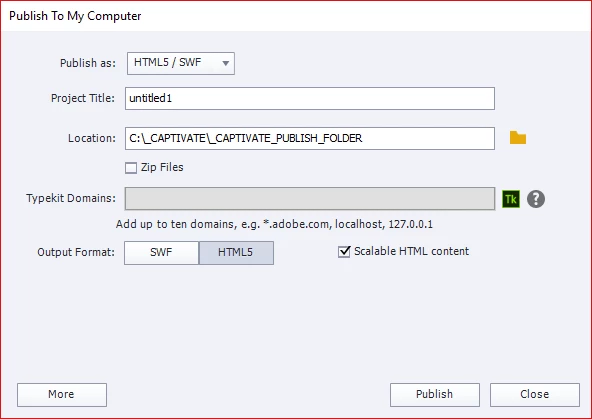
    It's a common misconception that only Responsive courses can be played on mobile devices.  All you really need for a mobile device is to publish to Computer and select the push button for HTML5 (not SWF).  In a somewhat unintuitive piece of UI design, the HTML5 button will look greyed out and dull when it is selected.

    Make sure you select the scalable HTML box as well.

    1 reply

    Lilybiri
    Legend
    July 17, 2018

    Is there any reason why you wanted this to be with Breakpoint views, instead of publishing to rescalable HTML?

    Can you check the exact version number? It should be 9.0.2.437.

    Known Participant
    July 17, 2018

    Thank you for the response!

    I wanted the interactive puzzle to be workable on a desktop and mobile device. I thought using "Responsive Project" was the best way to do that. It allows me to "Publish for Devices."

    If I use Rescalable, what would I choose from the Publish dropdown? The options are to Publish for Computer or Devices (App). The Index file will then be uploaded in Dreamweaver for a website.

    Thanks again, Jen

    Known Participant
    July 17, 2018

    ...Also my version is: 9.0.2.437.