
EngilityTrain
Inspiring
January 15, 2016
Answered

Restricted navigation using advanced actions in Captivate 9

  • January 15, 2016
  • 7 replies
  • 1075 views

Hello,

My customer likes to have restricted navigation on some slides so the learner has to click on all the items on the slide before going to the next page. I'm using the play bar for navigation. Here are the steps I took:

  • Added user variables
  • Advanced Action to increment the variable by 1 each time the button is clicked and show the hidden content
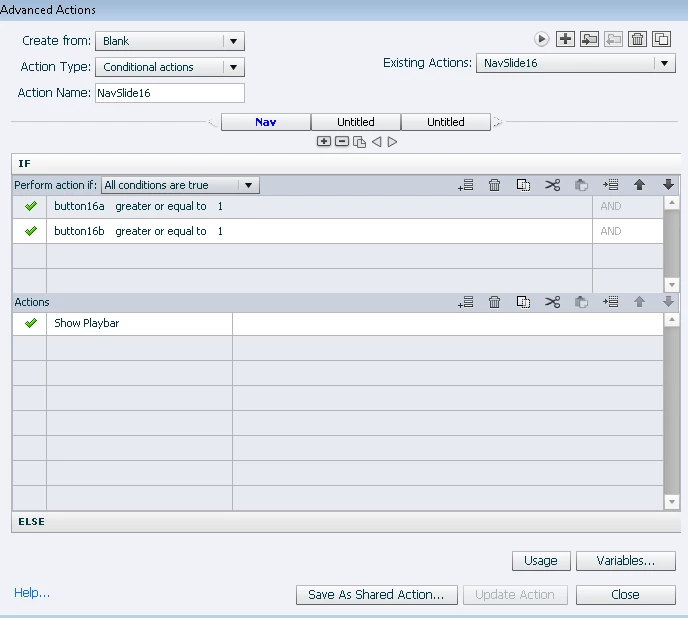
  • Conditional action on the slide, On Enter, to show the playbar when all of the button's variable is greater or equal to 1, otherwise hide the play bar. But the conditional action is not working and the play bar remains hidden. What am I missing?
This topic has been closed for replies.
Correct answer Lilybiri

The On Enter action is only executed when you 're-enter' the slide. I suspect that is not the case here if my intuition is correct. An advanced action has always to be triggered by an 'event'. You could have a look at my post about events (has a descriptive list that you can download for free): Events and (advanced) Actions - Captivate blog

You have to combine both actions in one conditional action with two decisions, to be triggered by the buttons. I have posted that work flow already multiple times. The conditional action needs two decisions:

First decision 'Always' is a mimicked standard action:

  IF 1 is equal to 1

      Increment v_button1 with 1    I prefer identifiying each object, v_ indicates this is a variable

      .....            the other commands you want to be done

Second decision 'Check it'

  IF v_button1 is equal or greater than 1  AND

      v_button2 is equal or greater than 1

  Show Playbar

It is not possible to use a shared action in this case. The sequence of those two decisions is very important.

7 replies

Lilybiri
LilybiriCorrect answer
Legend
January 15, 2016

The On Enter action is only executed when you 're-enter' the slide. I suspect that is not the case here if my intuition is correct. An advanced action has always to be triggered by an 'event'. You could have a look at my post about events (has a descriptive list that you can download for free): Events and (advanced) Actions - Captivate blog

You have to combine both actions in one conditional action with two decisions, to be triggered by the buttons. I have posted that work flow already multiple times. The conditional action needs two decisions:

First decision 'Always' is a mimicked standard action:

  IF 1 is equal to 1

      Increment v_button1 with 1    I prefer identifiying each object, v_ indicates this is a variable

      .....            the other commands you want to be done

Second decision 'Check it'

  IF v_button1 is equal or greater than 1  AND

      v_button2 is equal or greater than 1

  Show Playbar

It is not possible to use a shared action in this case. The sequence of those two decisions is very important.

EngilityTrain
Inspiring
January 19, 2016

OMG....It's working thank you very much.