Paul Wilson CTDP
Community Expert
Community Expert
July 26, 2021
Answered

Retain Preference Settings from One Computer to Another

  • July 26, 2021
  • 1 reply
  • 365 views

I know that you can edit the preferences with no project open and have those save the preferences for all future projects created. I also know that I can set preferences like the default duration of shapes for a particular project. If I send that file to another Captivate user, will those preferences get maintained for the other user?

This topic has been closed for replies.
Correct answer RodWard

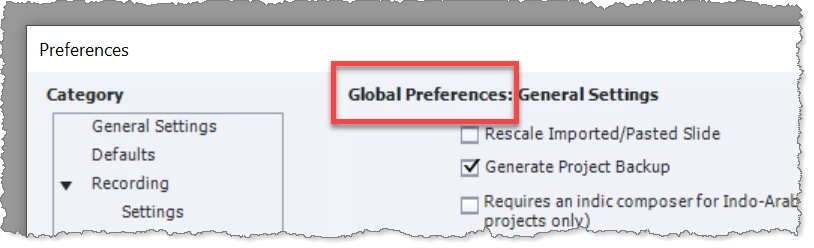
If you are talking about Global Preferences, they only exist on your system. You can tell when the preferences are Global because the Preferences dialog indicates it clearly.  However, you will notice that there is no section for Quiz Settings that you can configure as a Global Preference.

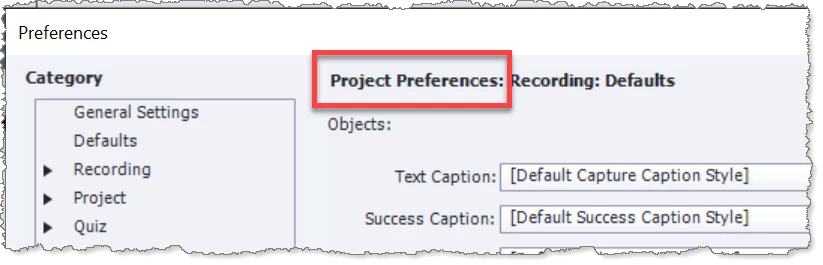
Other preferences apply only to the CPTX project file that was open and those would be saved in the file.   These are shown by the dialog as Project Preferences. 

So for example you can set up a CPTX to have certain SCORM settings that travel with the CPTX file because they can only be Project preferencs,


So, look at the Preferences dialog and it will tell you what you are dealing with.

1 reply

RodWard
Community Expert
RodWardCommunity ExpertCorrect answer
Community Expert
July 26, 2021

If you are talking about Global Preferences, they only exist on your system. You can tell when the preferences are Global because the Preferences dialog indicates it clearly.  However, you will notice that there is no section for Quiz Settings that you can configure as a Global Preference.

Other preferences apply only to the CPTX project file that was open and those would be saved in the file.   These are shown by the dialog as Project Preferences. 

So for example you can set up a CPTX to have certain SCORM settings that travel with the CPTX file because they can only be Project preferencs,


So, look at the Preferences dialog and it will tell you what you are dealing with.

Paul Wilson CTDP
Community Expert
Community Expert
July 26, 2021

Thanks Rod. That's what I was looking for.

Paul Wilson, CTDP