Participant
July 13, 2011
Question

Retake quiz and action Pass or Fail

  • July 13, 2011
  • 1 reply
  • 585 views

Hello,
I'm using Adobe Captivate version 5. I have created a simple quiz and exported it into Scorm to make it compatible with an LMS platform.
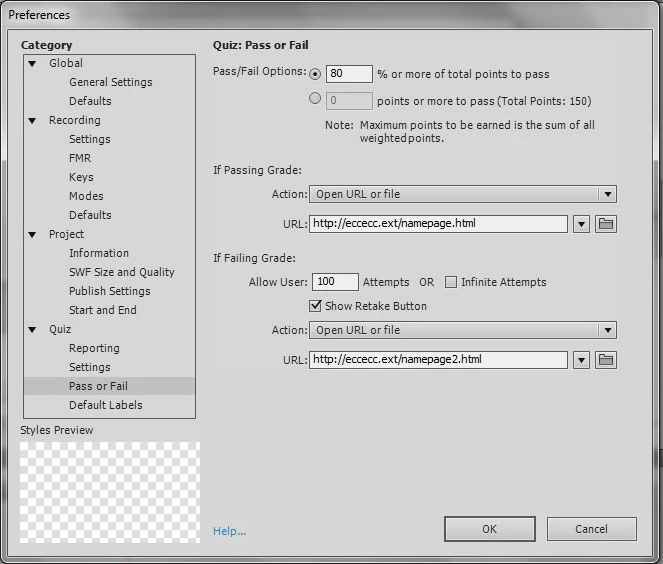
I have set up the following command lines in "Publishing Settings" within the "Pass or Fail" item of the "Category Quiz":
If Failing Grade: Allow User: 100 Attempts with Show Retake Button Action: Open URL or file URL:http://eccecc.ext/namepage2.html
My problem is the following: when I execute the package and arrive at the end of the quiz, if I click on Ratake Quiz instead of clicking on Continue, the quiz starts again but a few seconds after I am redirected to the page which is indicated in the URL. Consequently, I am unable to repeat the quiz.
Do you know how to solve that problem?
Any help will be greatly appreciated.
Thanks in advance.
Astox
P.S. Please find attached a screenshot of the configuration described above.
This topic has been closed for replies.

1 reply

Lilybiri
Legend
July 13, 2011

Hello,

Please what are your SCORM settings (Reporting as well as Manifest)?

Lilybiri

RodWard
Community Expert
Community Expert
July 13, 2011

Captivate is working as designed.

Your settings have told Captivate that if the user fails the quiz (which is the only way they will see the Retake Quiz button) then it should launch a browser and open the URL you specified.

This failure action fires off as soon as you hit either the Retake Quiz or Continue buttons on the Quiz Results slide.

So if you only want the URL to be opened once they've finished with the quiz and failed it, set the Quiz > Pass/Fail action to go to another slide beyond the Quiz Results slide and set the OnSlideEnter action of this slide to open the URL.

astoxAuthor
Participant
July 15, 2011

Problem solved!

Thank you very much for your help.