
August 9, 2013
Question

Retake Quiz button doesn't work properly when quiz slides are placed in between content slides

  • August 9, 2013
  • 1 reply
  • 770 views

I've created a course using CP 6 and running on Cornerstone. The course structure is (roughly) as follows:

  1. A few content slides
  2. Quiz question(s) (Learning Checks that are scored)
  3. a few content slides
  4. Quiz question(s) (Scored learning check)
  5. a few content slides
  6. Final Evalutated simulation (which includes multiple slides where the user must demonstrate steps to perform a task)
  7. Quiz results

See image below for simplified view.
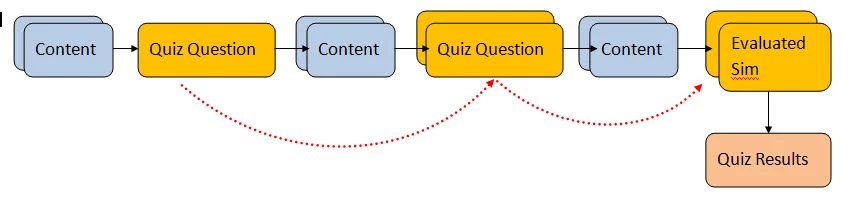
If the user fails, the "Retake Quiz" button appears on the Quiz Results page. When the user clicks it, it goes to the first quiz page but then follows to the next content slide. How can I make it follow the dotted red line instead so that the user is ONLY required to take the quiz pages?

Alternatively, if this is not possible, how can make the user retake the entire course and with no hangups or stalling in the LMS?

Please help!!! Thank you!

This topic has been closed for replies.

1 reply

Varun Kalra
Participating Frequently
August 9, 2013

Hi there,

That can be achieved using advanced actions in Captivate.

Please check the similar thread : http://forums.adobe.com/message/5306852

please reply if you need more explanation on the advanced actions.

Thanks.

August 9, 2013

Thanks for your response Varun.

I may have not fully understood the explanation in the thread you provided. It sounds like that is what I would need to write to Review the quiz as opposed to Retake. To clarify is the advanced action (in the sample thread you provided) referring to whether or not a slide has been viewed or does it erase the user's response and allow them to enter a new answer then skip to the next quiz question?

Again, your help would be appreciated.

Lilybiri
Legend
August 9, 2013

Hi,

Once wrote a more detailed blog post about skipping correctly answered questions, the approach with advanced actions and variables is similar to the one explaned by Varun. http://blog.lilybiri.com/review-only-incorrect-slides-captivate-6

The idea is that to you need a 'clue' for Captivate to know that a content slide is already visited a first time, and in that case skip the content slide. That 'clue' can be a user variable with a default value of 0 that is toggled to 1 on first visiting the slide. And on entering the content slide you check if the variable is 1, in that case you skip the content slide by the action 'Go to Next slide'. Varun tells in the other thread to toggle the variable by the On Exit event for the content slide, I am not using that event much because I don't know if you do not have another interactive object on that slide with a simple action to proceed?

If the content slides, between two sequences of question slides,  are in a linear sequence (no branching), one user variable (v_visit1 for first sequence which you indicate in your first post as 3., v_visit2 for second sequence, 5. in your example) will be sufficient. That variable can be toggled to 1 on any slide of the sequence (maybe the last one, and you could use the On Enter event in that case). Then you'll need only a conditional action on the first content slide of that sequence, for the first sequence of content slides this could be something like:

  IF v_visit1 is equal to 1

      Jump to slide Quiz4_1   the first Question slide in 4.

Lilybiri