
Retake Quiz Button with Required Questions Producing Blank Answer Choices
I’m running in to an issue where the answer choices disappear when using a Retake Button for the Quiz. I'm currently using Captivate 9.
The button and quiz are set as follows:
• Checked Infinite Attempts and Show Retake Button under QuizPass or Fail
• Using random question slides and question pools for quiz
• Questions are required; student cannot advance without answering the question
• Questions allow one attempt per test (cannot change an answer choice while in the test)
• Built in buttons like clear, back, and skip are not allowed
• Captions for both Correct and Incomplete are set
• A master slide formats the questions to all have the same look
It’s difficult to recreate the issue, though it consistently occurs following these steps on SCORM Cloud and other systems:
1. Student takes the quiz and answers all the questions
2. The student fails the quiz and hits the retake quiz button
3. The student can retake the quiz as many times as they want provided they do not exit
4. The student can also retake the quiz as many times as they like if they exit and have clicked on the answer choices first before clicking for the question to advance to the next question
5. If the student tries to advance to the next question without answering, the quiz still works if they do not exit
6. If the student exits and tries to retake the quiz, it works the first time
7. If they try to retake it again, though, the answer choices disappear and they cannot move forward.
In short the answer choices ONLY disappear if a student tries to advance on a question without answering, exits the course at some point after, re-enters and retakes the quiz and fails, then tries to retake the quiz again.
IE debugging mode (F12) doesn’t show any errors other than under Console, which just says Out of stack space.
It looks like this when the answer options do not appear:
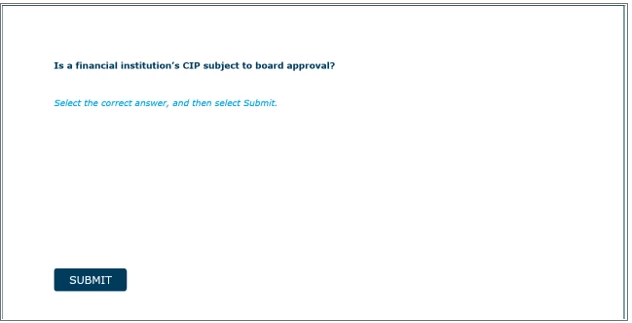
Answer choices disappear.
Any thoughts on why this would occur and how to fix? Nothing we've tried has worked so far.
 AdChoices