

Return a list of answers - cpQuizInfoAnswerChoice
I'm using Captivate 8.0 and would like to have a list of answers from the Multiple choice quiz to auto populate onto an ending slide tha tI create. It would essentially be a review quiz results list. This list can then be printed or sent by email to their supervisor. Yes, the results will be in the LMS, but for reasons too many to explain here, that isn't the best solution for this situation.
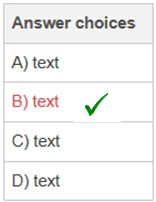
To give a visual, I'm thinking of a blank slide at the end of the quiz with a simple format such as the one shown and a checkmark to show the answer choice selected from the quiz. it could be different and only show the question and either "correct" or "incorrect". There are 4 answer choices for each question.
Question 1 text (or rule name) & B is the correct answer and the one selected by the user.
How do I set up advanced actions and slide enter/exit parameters to return the user's answer selection or "correct"?
I'm pretty sure I'll need to use cpQuizInfoAnswerChoice the way to go? I did insert a blank slide after each quiz question and assign variables to each question as shown in lilybiri's explanation of "Secrets of cpquizinfoanswerchoice" (http://blog.lilybiri.com/secrets-of-cpquizinfoanswerchoice-and). However, I'm not able to understand how to convert these instructions into a return of the answer on a new final slide (not the quiz results slide, but a blank one that I create).
I don't understand exactly what information cpQuizInfoAnswerChoice is pulling from the results. Is it the answer letter choice or is it correct / incorrect, true/false, 1/0? Knowing this will help me to create an advanced action.
How do I use this the cpQuizInfoAnswerChoice variable as an if/then advanced action?
- = true?
- = 1?
- IF =B (correct answer) THEN show checkmark (on list created on last slide)
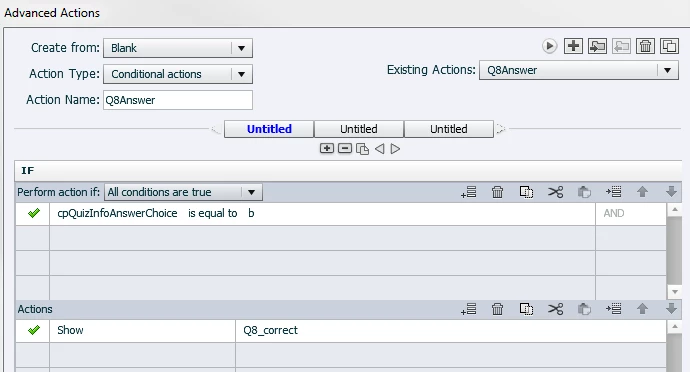
Q8_Correct is a checkmark next to the answer choices on the last slide.
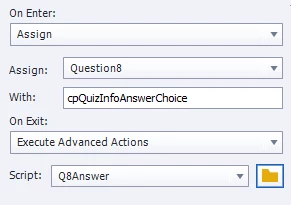
The blank slide I have inserted after the quiz question looks like this for enter/exit. Question 8 is the only one I'm experimenting with right now and the variable assigned to the question is "Question8".
Are there some Captivate users out there that can help me with this?
Thank You!!
 AdChoices