


tdcraggette
Participating Frequently
May 7, 2021
Question

Reveal custom navigation on quiz slides after question is answered

  • May 7, 2021
  • 2 replies
  • 1133 views

Hello all.


First off, sorry for the scribbles.

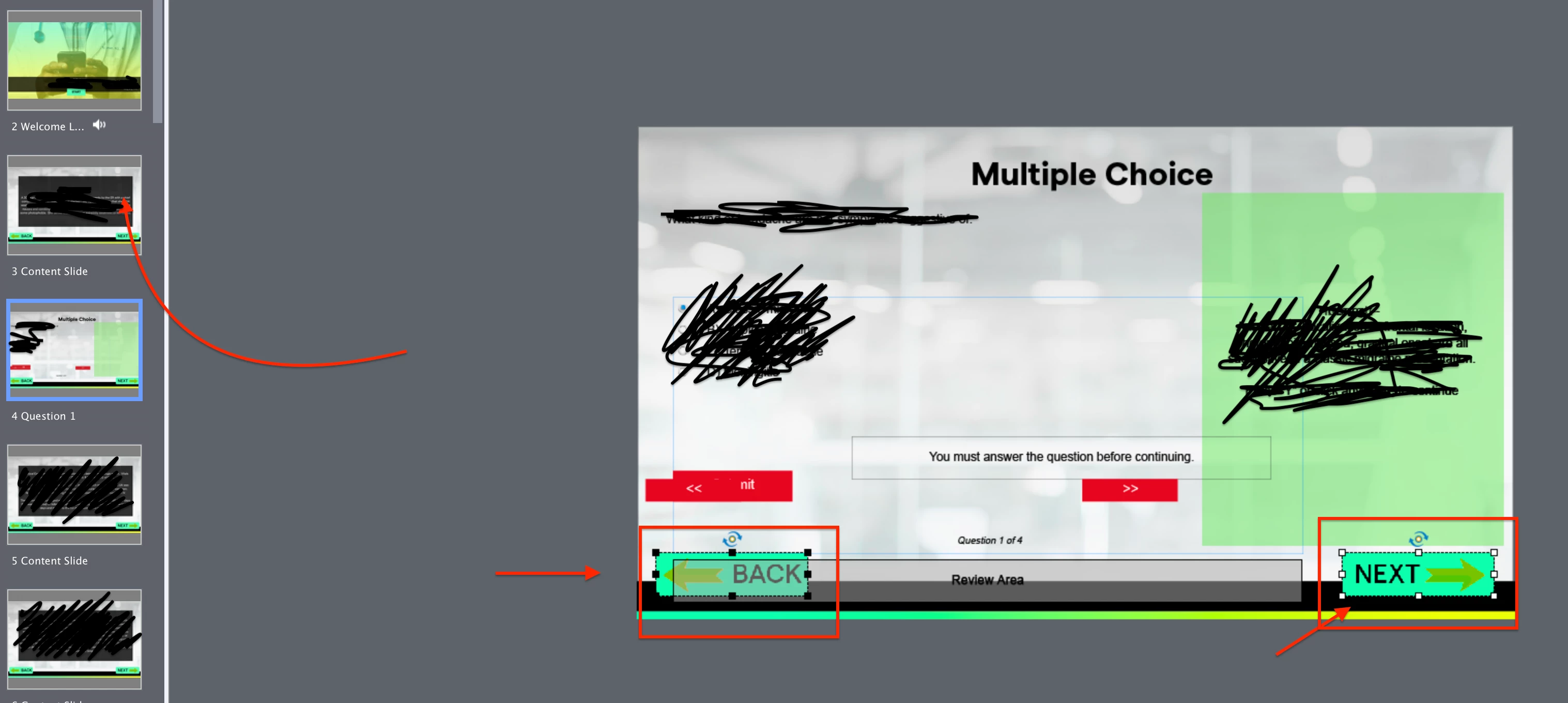
I have a client that wants the custom buttons (navigation) to appear after a learner answers a quiz question. The quiz is a single attempt quiz and is a requirement for for reporting purposes. I'm not sure how to make this happen since I can't apply an unhide action. Also, this navigation needs to stay unhidden for the entire course once the quiz question is answered. The user won't be able to answer the question but the hope is they can travel back and forth to read the content information.


Any help is appreciated.
    This topic has been closed for replies.

    2 replies

    Paul Wilson CTDP
    Community Expert
    Community Expert
    May 9, 2021

    Something like this might be a solution for you: https://youtu.be/wa4KBTH7t-w

    Paul Wilson, CTDP
    tdcraggette
    Participating Frequently
    May 10, 2021

    Thank you, Paul. It was a plesure having you as my instructor a couple months ago for the Captivate live training and thank you for the video suggestion.

    Paul Wilson CTDP
    Community Expert
    Community Expert
    May 10, 2021

    You're welcome. 

    Paul Wilson, CTDP
    Lilybiri
    Legend
    May 7, 2021

    Not completely clear what you want. I hope you are aware of the fact that the answer will be blocked if the learner comes back to the question slide?

    Do you have only one attempt on both question level and quiz level? Do you allow Review in the Quiz Preferences?

    You will need to use the On Enter action of the question slide to turn the custom navigation buttons on. But I don't know if those buttons are on the master slides or on the first slide and timed for the rest of the project?

    tdcraggette
    Participating Frequently
    May 7, 2021

    Hi Lilybiri,


    Thanks for the reply I'll try to clarify.

    Lilybiri
    Legend
    May 8, 2021

    I would have preferred to give me answers. I have watched that almost 4 minutes of video but still didn't get them. I only learned that:

    • You are on Mac
    • You allow backwards navigation but took out the default back button
    • You have Review enabled 
    • Those custom buttons appear on each slide where you need them, they are not on the master slide nor timed for the rest of the project. Which would mean you only need them on the quiz slides?

    I still don't know the answer to the question: How many attempts do you allow ON QUIZ LEVEL???


    The only answer I can give now is:

    • Group the Back and Next button, label them Gr_buttonx
    • Use the On Enter event of the question slide to 'Hide Gr_buttonx'
    • Use the Success and last Attempt actions for a shared action (certainly if you have multiple slides with the same requirement) or an advanced action like this:
          Show Gr_buttonx
          Continue  (or go to Next Slide)

    BTW next time you record such a video, please open the Timeline panel.  It provides a lot of information which I didn't ask about yet.