
Participant
January 26, 2016
Question

Review screen for each

  • January 26, 2016
  • 1 reply
  • 118 views

I'm making an assessment for a client and I've encountered an issue such that when you answer a question, correctly or incorrectly, the presentation gives you what appears to be a review screen for that question once you answer it. I think the intention here was for the learner to be able to see their chosen answer and the actual correct answer. That's all and fine, but what I really want is for the project to advance to the next question in line without the review step. Here are my settings for quiz items:
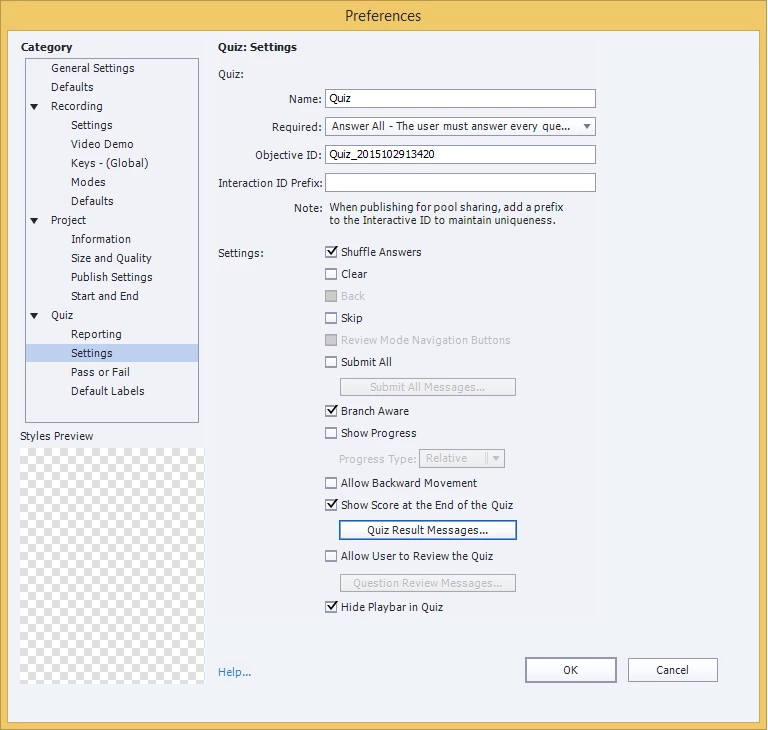
Thanks in advance.

-Marc

    This topic has been closed for replies.

    1 reply

    Lilybiri
    Legend
    January 26, 2016

    I don't know which version you are using, but most of what is explained in this blog post is still valid in CP9. Main changes are for the buttons during Review - Back/next - that have been added in CP9.

    Question Question Slides in Captivate - Captivate blog

    I never knew a question slide to show the Review immediately in CP (maybe in another tool): only after finishing the Quiz, if you allow Review in the Quiz Preferences, and click the Review button, that situation will occur and the user can navigate the quiz that shows the given answers and the correct answers.

    Look at the blog post: Submit is normally a two-step process:

    1. User clicks Submit button: feedback appears, can be Success or Failure feedback, depending on the Number of Attempts it can also be a Retry text. Those feedbacks include the invitation to click on the slide or to press Y
    2. User clicks on the slide (or presses Y): the playhead will advance beyond the pausing point and the actions specified for Success/Failure (if it is the last attempt) will occur.

    Tweaking possibilities are explained in the blog post.