Inspiring
December 28, 2015
Answered

Rewind Video 10 seconds

  • December 28, 2015
  • 1 reply
  • 1727 views

Hello,

I have a slide that contains a video that is several minutes long. In case the viewer misses some information, I'd like to have a "Rewind" button that jumps back X frames and continues playing the video. I am not looking to have the slide jump back to the very beginning of the slide, but rather jump back a certain number of frames or seconds from whenever the button is pressed.

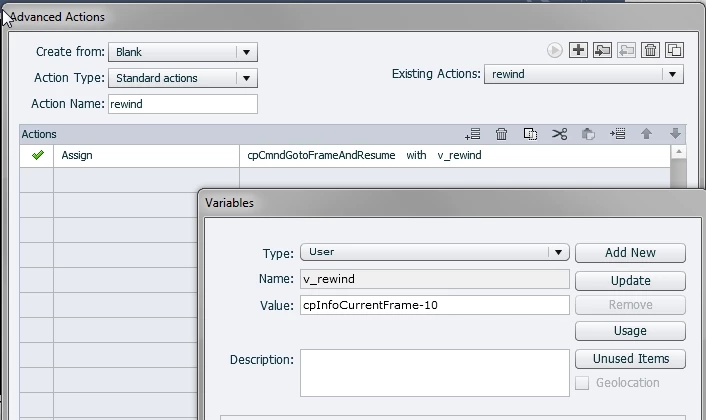
I have created a variable called "v_rewind" set to a value of "cpInfoCurrentFrame-10". On click of the Rewind button, I assigned "cpCmndGoToFrameAndResume" with "v_rewind".

When I run the project, the button does not work as intended. Instead it jumps back to the first slide of the project. Does anyone know how to fix my script?

This topic has been closed for replies.
Correct answer Lilybiri

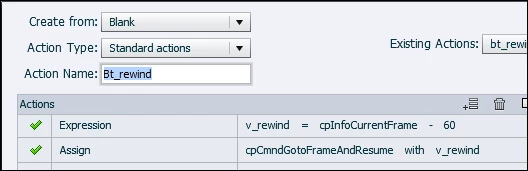
That value is a text, it will never 'calculate' anything. And since any text is considered the same as the number '0', you will always rewind to the first frames, which has number 0.

I hope it is multisynchronized video?  Because this will not work with event video. Create an advanced action to be triggered by your button:

I used 60 frames, which is 2 seconds. Your amount of 10 frames is only 1/3sec? If you want 10 seconds, you'll need to replace 60 by 300.

1 reply

Lilybiri
LilybiriCorrect answer
Legend
December 28, 2015

That value is a text, it will never 'calculate' anything. And since any text is considered the same as the number '0', you will always rewind to the first frames, which has number 0.

I hope it is multisynchronized video?  Because this will not work with event video. Create an advanced action to be triggered by your button:

I used 60 frames, which is 2 seconds. Your amount of 10 frames is only 1/3sec? If you want 10 seconds, you'll need to replace 60 by 300.

Inspiring
December 28, 2015

Perfect! Thank you so much!