Right-click issue in simulations (Windows 10)
Hi, I've been using Captivate 9 (version 9.0.1.320) to build a course which features a few simulations.
Everything was fine when we had Windows 7, but since we upgraded to Windows 10 an issue has arisen when using Internet Explorer.
Whenever the learner has to right-click on the screen, the Flash menu appears (see screenshot below).
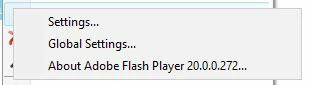
Please note that it works fine in Chrome - the issue appears to be specific to Internet Explorer (we've tried ie9 and ie11) in Windows 10.
I have the correct settings with Right-Click ticked and Accessibility disabled and, as I said, it was working fine with Windows 7 and works in Chrome. The course is published for both Flash and HTML and is running on SCORM cloud. We've updated Captivate to the latest version but that hasn't fixed the issue.
Has anyone else experienced this issue and do you have any advice on how to fix it?
Any help would be greatly appreciated.
 AdChoices