April 2, 2010
Answered

Rollover Area top of timeline, but underneath text

  • April 2, 2010
  • 1 reply
  • 342 views

Good Day (and Good Friday),

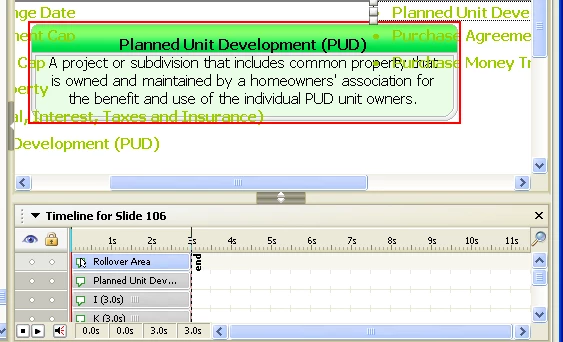
My Rollover Area is at the very top of the timeline, but there are Text Captions that are displaying over it (can see this in Captivate, and when running project). Attached is an image of this. I'm guessing I'm missing something simple, but I want the Rollover to display on top of everything else. Any ideas?
Thanks,

-Matt

    This topic has been closed for replies.
    Correct answer Lilybiri

    Hello,

    From what I see on you snapshot, I think it is a Rollover Text?

    Could you select the Rollover Text, open the right click menu and choose Order, and Bring to Front? Tried your workflow out, and got the Rollover text indeed partly hidden by other Text Captions, but when changing the order it worked fine.

    Lilybiri

    1 reply

    Lilybiri
    LilybiriCorrect answer
    Legend
    April 2, 2010

    Hello,

    From what I see on you snapshot, I think it is a Rollover Text?

    Could you select the Rollover Text, open the right click menu and choose Order, and Bring to Front? Tried your workflow out, and got the Rollover text indeed partly hidden by other Text Captions, but when changing the order it worked fine.

    Lilybiri

    April 2, 2010

    Hi Lilybiri,

    That was it! Thanks for your help. I now realize that not just the "rollover area" can be Z-ordered (bring to front/back), but also the rollover text (highlighted in red in my image) can also be Z-ordered. But it looks like the rollover text does not show in the Timeline, which was the confusing part. Got it now.

    Thanks again

    -Matt