

Bob_Elmore
Known Participant
February 14, 2017
Answered

Running web server behind fire wall - getting error message

  • February 14, 2017
  • 1 reply
  • 321 views

I need to put some Captivate lessons on an internal web server.

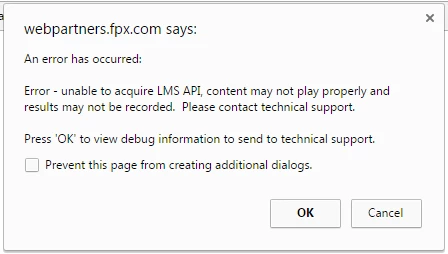
When I run a lesson, I get the error below. 

If I click OK everything works fine, but what can I do to avoid this problem?  It looks like Captivate is trying to access outside resources which are not needed in this case.  I tried pulling out some obvious SCORM content but the message is still there.  And can I set up something in the publishing setting to avoid this?
Thanks.

    This topic has been closed for replies.
    Correct answer RodWard

    The only thing I can think of that might have happened is that while you don't CURRENTLY have this option selected, you may have published with it selected some time ago and those files are still on the server.

    If you published without LMS reporting turned on then your published output should only have a handful of files.  One or two SWFs, an HTM, a CSS, and a JS file.

    How many files does your published output have?

    1 reply

    RodWard
    Community Expert
    Community Expert
    February 15, 2017

    This error message indicates that your content is currently set up to report to an LMS (probably using the SCORM standard) but cannot find any LMS when launched.

    If you are NOT going to be delivering your content from an LMS then you should really reopen the original CPTX file/s and republish with LMS reporting turned OFF.

    Bob_Elmore
    Known Participant
    February 15, 2017

    Thanks Rod, that's what I thought too, but I don't see that I have any such options turned on. 

    I am not using a quiz so I don't have Enable reporting for this project checked.

    Is there somewhere else I need to check?

    Thanks.

    RodWard
    Community Expert
    RodWardCommunity ExpertCorrect answer
    Community Expert
    February 15, 2017

    The only thing I can think of that might have happened is that while you don't CURRENTLY have this option selected, you may have published with it selected some time ago and those files are still on the server.

    If you published without LMS reporting turned on then your published output should only have a handful of files.  One or two SWFs, an HTM, a CSS, and a JS file.

    How many files does your published output have?