


Participant
July 30, 2024
Question

Saving Options

  • July 30, 2024
  • 2 replies
  • 178 views

Hello,

I need help saving.  I have created a project and published it as a HTML5 zipped file.  This is what is needed for the LMS.  However, as the developer, I would like another version that I can open and edit.  This is usually represented as a blank paper icon and as a .cptx file (see image below).  
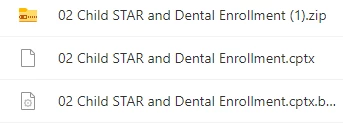
The person that created these is no longer with the company and I can not figure out how to save my project in order to have that second option.


Thank you for your help!

    This topic has been closed for replies.

    2 replies

    GeekyGirlRex7295714
    Community Expert
    Community Expert
    August 14, 2024

    Do you have Captivate installed on your computer? If you do not, then you should download and install it. After installation, open the cptx file.

    Writer | Developer | Facilitator | Geek!
    RodWard
    Community Expert
    Community Expert
    August 1, 2024

    The zipped file is likely to be a SCORM output version of the CPTX project file in that same folder.  The third file in your list will be the cptx.bak backup file which is a copy of the project file at the last save date.


    From the description of your problem, and the fact that your screenshot does NOT show the CPTX file with a Captivate icon, I would suggest that you do not currently have Captivate 2019 (Captivate Classic) installed.  


    Is that correct?