
ORC19
Participant
May 18, 2017
Question

Scale text option missing from checkbox learning interaction - Captivate 10 (newest version)

  • May 18, 2017
  • 1 reply
  • 232 views

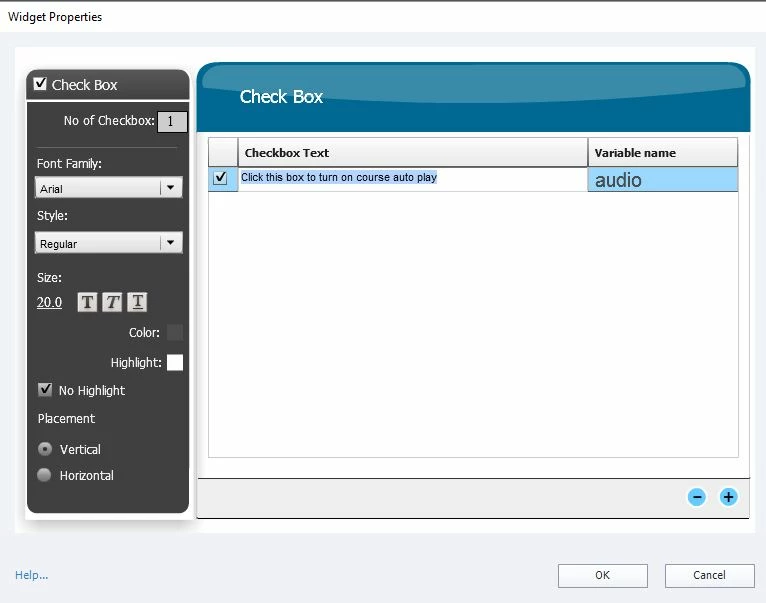
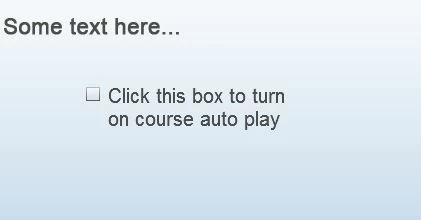
I can't seem to find the "scale text" option for the checkbox learning interaction in this new version I just installed.  I'd rather not have this checkbox wrap the text like this (see second screenshot below). My apologies if I'm missing something here. I'm just now getting familiar with this new version.

Here's what I see:
And on the screen in preview mode:
    This topic has been closed for replies.

    1 reply

    Lilybiri
    Legend
    May 18, 2017

    Responsive project or not?


    Checkbox widget never had a Scale text option. You can only change the fixed font size, is set to 20 in your screenshot, get it down to 12 to avoid wrapping.

    ORC19
    ORC19Author
    Participant
    May 18, 2017

    I found this older discussion on the forum which mentions it. I do see the option for the radio button (screenshot below). I could have sworn it used to be an option for the checkbox as well. At any rate, I suppose I could use the radio button, if needed, but the checkbox is preferred.

    Lilybiri
    Legend
    May 18, 2017

    Of course, that was me as well showing the screenshot, but it was NOT for the checkbox widget, only for the radio buttons widget. Some interactions have the Scale text, not all of them do.