Known Participant
March 27, 2024
Question

Score % Reporting LMS Issue

  • March 27, 2024
  • 2 replies
  • 1153 views

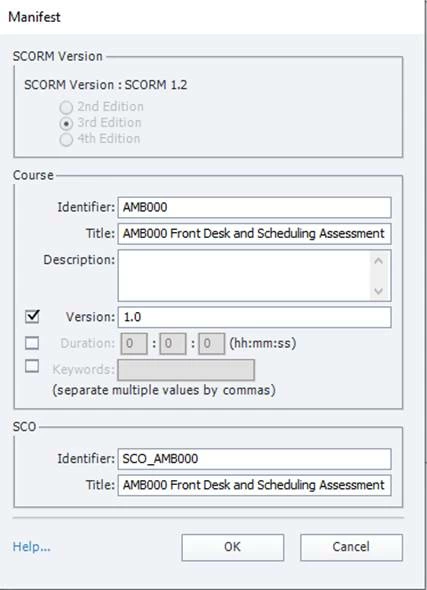
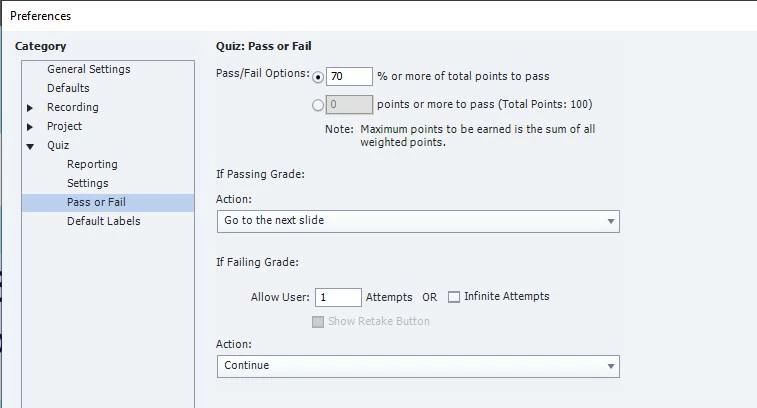
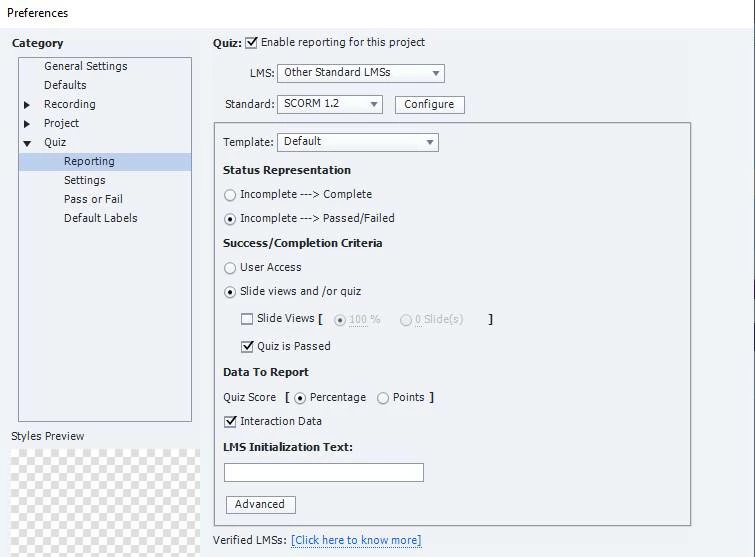
I am on Windows, using Captivate 2019 & publishing to our organization’s LMS, HealthStream. Here is the issue I am having with an assessment ( I have included screenshots of the settings in Captivate which I hope will be helpful) …

I set the pass/fail option in Captivate to 70%. When a user takes the quiz and scores 85%, the LMS reports the score as 70% instead of the actual score of 85%.
 

My client is wondering why his assessment is not available yet, so help will be greatly appreciated!


This topic has been closed for replies.

2 replies

RodWard
Community Expert
Community Expert
March 28, 2024

Your screenshots from SCORM Cloud indicate that your module passed with a score of 85 out of 100 (i.e. 85%).

I think that indicates that your issue is with your own LMS.

Known Participant
March 28, 2024

Rod ... You indicate the issue is with the LMS (which the Admin says he has not made any changes to ) & Lilybiri ...  You indicate the issue is within Captivate ... How should I proceed to solve this? 

RodWard
Community Expert
Community Expert
March 29, 2024

I still believe the issue is with your LMS.
Your screenshots show that SCORM Cloud correctly received data for each of your 20 quiz questions.  5 points each except for the three that you deliberately completed incorrectly to achieve the 85% score.

The other screenshot from SCORM Cloud shows it passed the module with a score of 85 out of a possible maximum of 100 (i.e. 85%).

In SCORM 1.2 cmi.core.score.raw is the number that reflects the performance of the learner relative to the range bounded by the values of min and max.  You have a maximum possible score of 100 in your course and the learner achieved a score of 85.

To be honest, it's not uncommon for LMS people to blame the SCORM module when things don't work as expected.  However, after many years on this forum I have no hesitation in saying that the vast majority of similar cases to yours turned out to be the fault of the LMS.  That's why we ALWAYS suggest people should try the same SCORM module in a different LMS, and the easiest alternative LMS to use for this purpose is SCORM Cloud.  It has an impeccable reputation for compliance with SCORM rules.  That's not something that can be said for most other LMSs.


The problem here is that each LMS vendor is free to interpret the SCORM standard as they see fit, and that can lead to situations where results vary between LMSs.


I still suggest you go back to your LMS and present them with the same screenshots you showed here and ask them to get the technical people from the LMS programming team to wade into the problem.  All LMSs generate log files when a user interacts with a SCORM module being delivered to the LMS.  So, the technicians should be able to investigate this situation via log files and work out why the LMS does not accurately record a score of 85% in this case.  The person serving as Admin for your LMS is unlikely to have this level of expertise, and the fact that they personally "haven't changed anything" does not prove that the LMS is functioning correctly.  We often see cases where updates are performed remotely by vendors without LMS Admins being aware.


I know this doesn't fix your issue, but I hope it gives you some ammunition to use in your defence.

Lilybiri
Legend
March 27, 2024

Can you check the Advanced Interaction panel (F9)? Maybe the total score is not what you expect it to be, because you have included scored objects?

Known Participant
March 27, 2024

I checked the F9 ... No scored objects ... All 20 questions (5 points each) are click boxes ... all included in total score

Lilybiri
Legend
March 27, 2024

So it looks like the correct score is not transferred to the LMS. I see that the Pass action has been changed from Continue to Go to Next slide. Both the actions (Pass/Fail) are normally due to triggered by the Continue button on the Score slide, but at the last frame of that slide. You have a slide after the score slide, which is fine. Can you try to set the action for Pass back to Continue? You can always move the pausing point of the score sldie closer to the end of the slide to keep the waiting time low.

SCORM 1.2 has a limited possibility to transfer interaction data, but 20 questions seems not too bad. Did you test on SCORM Cloud to check if the problem could be due to the LMS eventually?