Inspiring
June 20, 2013
Answered

Score reporting problem

  • June 20, 2013
  • 1 reply
  • 1131 views

Hello,

I'm using Captivate 5 on Windows 7.

I stumbled upon a problem I haven't seen before. I have a project with a quiz in the end. 2 points is the maximum score and 1 point is enouth to pass.

When I test the course I get 2 points and I can see that in my LMS but it doesn't say passed.

I have checked scoreable objects in Captivate and 2 points is the maximum.

Any ideas on what could've gone wrong?

Kind regards,

Patrik
This topic has been closed for replies.
Correct answer RodWard

Hello,

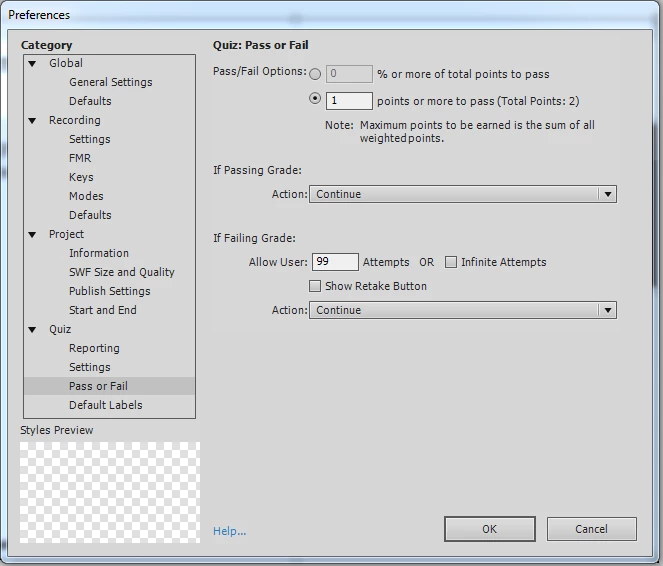
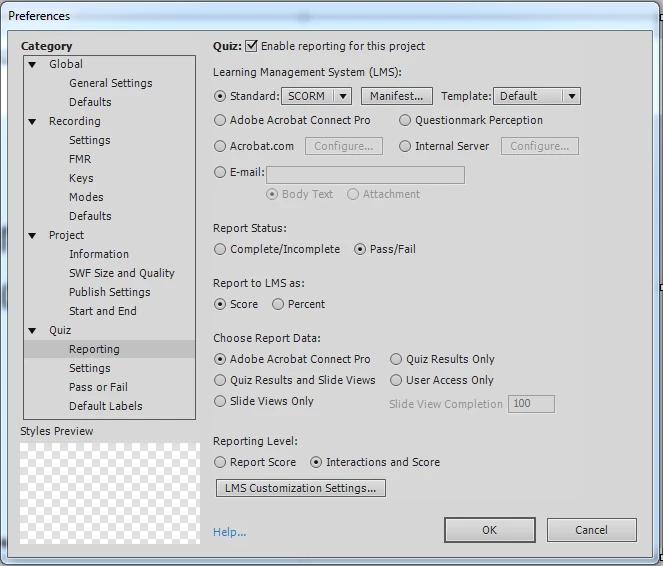
Here are two screen shots.

This is how I've done for the last project. Two points is the maximum and you need one point to pass. All of a sudden it stopped working.

Does it help?

Kind regards,

Patrik


OK.  It might help.  Change your setting for Report to LMS to Percent instead of Score, and change the Quiz > Pass/Fail option to Percent as well.  Set it to something less than 100%.  If you only have two questions and they only need to get one right to pass, then you can set it to 50% for a pass.

The way you have it set up at the moment means that if your user gets both questions right your LMS would see a score of 200% and some LMSs will balk at that kind of a result and not report the score. (Possibly because it would corrupt their internal database scoring algorithms or something.)  Anyway, you need to ensure that the highest possible score is 100% and nothing more.

1 reply

RodWard
Community Expert
Community Expert
June 20, 2013

Can you show a screenshot of your Quiz Results slide?  If you don't have one, try turning that option on in Quiz Settings so that you can get a better look at what is happening at the end of the quiz.

Inspiring
June 20, 2013

Hi,

I added the quiz result slide at the end of the quiz. It says:

Your score: 2

Max Score: 2

After I added that slide it shows 0 points in the LMS, before it said 2. I usually have no problems with the reporting in the presentaions. Very weird indeed.

Any other ideas?

Kind regards,

Patrik

RodWard
Community Expert
Community Expert
June 20, 2013

There would have been a Continue button on the Quiz Results slide.  Did you click that button to allow the module to terminate properly and send scoring to the LMS?