


gp73025452
Participating Frequently
July 10, 2024
Question

Scorm 1.2 All new Adobe Captivate 12.3

  • July 10, 2024
  • 1 reply
  • 509 views

I have uploaded 12.3 captivate package on scorm 1.2. In success and completion criteria, I have selected Quiz is Passed. When I complete the entire course I am getting 100% on scorm as I have selected All the correct answer.
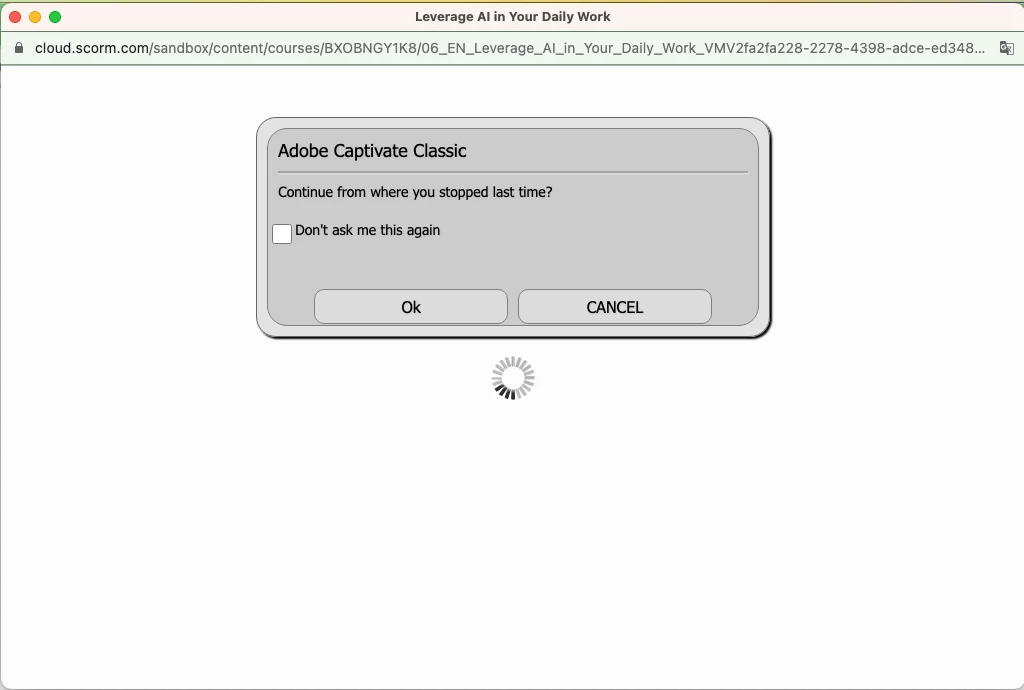
1) But the issue is when I Launch the course again it redirect me directly to the last visited slide. In Adobe captivate Classic version, When we relaunch the course again there is Popup comes and on that "Continue from where you stop last time" Ok and Cancel button was there. But in new Adobe captivate this popup is not comming it is redirecting me directly to the last visited slide.
2) In Adobe Captivate 12.3 version, when we relaunch the course which is half completed previously, it is not showing checked for the previously selected slides in Table of Content. In Classic version, it shows the checked in Table of content for previously visited slides after relaunch the course.
Is this bug of All new Adobe Captivate 12.3 or I have missed some setting for project in reporting? Thanks in Advance?
 

    This topic has been closed for replies.

    1 reply

    Lilybiri
    Legend
    July 10, 2024

    Did you upload to a LMS? The dialog box you are showing for Captivate Classic appears only if you are using bookmarking by TOC, not when using bookmarking by LMS. The TOC in this new version lacks a lot of settings, indeed.

    gp73025452
    Participating Frequently
    July 10, 2024

    yes, I have uploaded the Adobe captivate 12.3 course on Scorm LMS. But it is not showing dialog box which is shown previously Captivate classic version. Also visited check is not shown on TOC when we revisit the course again on LMS for previously visite slides.

    Lilybiri
    Legend
    July 11, 2024

    My explanation was not sufficient. I will try to elaborate:

    • If you upload to a LMS, the bookmarking feature of the LMS needs to be in charge. Even in Captivate Classic, having also bookmarking by TOC could have led to problems. Apparently you were lucky.
    • Bookmarking by TOC, which means activating 'Self-paced learning' would lead to the appearance of that dialog box (which even has an object style). In the new version there is no possibiity anymore to activate that bookmarking by TOC, so that dialog box will not appear. In Captivate Classic it was activated by default (bad choice IMO), so you may never have been aware of it since it didn't conflict with the LMS in your case.

    The LMS is in charge, you have to look at its features to have a similar warning appear. It cannot be done with Captivate because the feature 'bookmarking by TOC has been taken out.