
SCORM 1.2 will not launch in LMS
I am creating a SCORM 1.2 package in Captivate 2017v10.0.0.192 for PC
The package loads and tests fine on scormcloud.com. It will load to my LMS (BizLibrary) but when I try to launch I receive this error from the LMS:
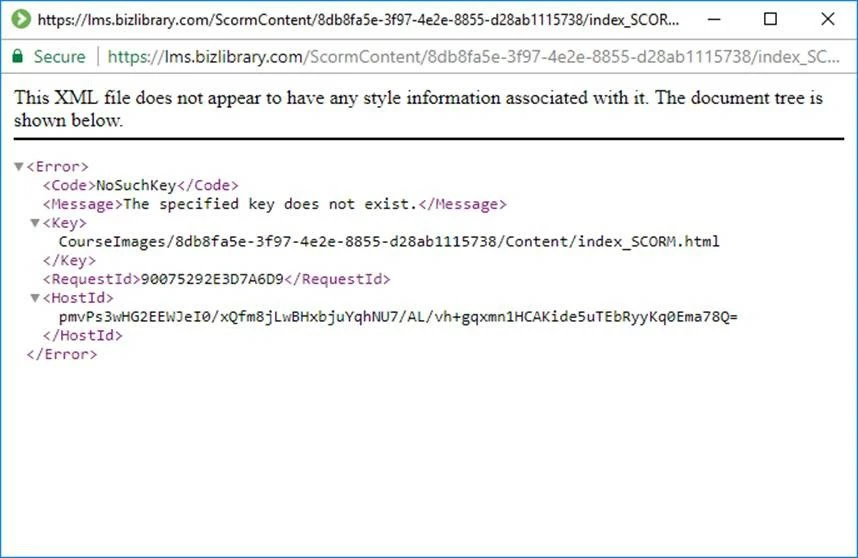
I have contacted BizLibrary support and this is what they are telling me:
- - -
In attempt to put this in English for you. Upon course launch we receive the error below:
<Error>
<Code>NoSuchKey</Code>
<Message>The specified key does not exist.</Message> <Key> CourseImages/8db8fa5e-3f97-4e2e-8855-d28ab1115738/Content/index_SCORM.html
</Key>
<RequestId>05FFF5145F0C51FD</RequestId>
<HostId>
DWnX/TYpI22M8NH3MWdl4fm63PmKMrc4g/JOHx4dvvnrX4B7ceZav3Z2YmHFyVvh3SmNf5KaSVQ=
</HostId>
</Error>
What the error is saying is the specific key (URL for Course Files) does not exist in the course. The system is looking for the path in the course build, so basically a folder in the build of the course called Content/followed by a file within that folder called index_SCORM.html (this is a file that should automatically be generated during the publish of a SCORM 1.2 course)
The first part (courseimages/numbers) is only used for our system on the back end and is irrelevant to the client.
So basically they need to revisit the build of the course and ensure that the path noted above is correct and files are present.
- - -
I am not savvy enough to understand what needs to be moved where to make this package launch properly. It doesn't make sense to me that it would launch properly in scormcloud but not in the LMS. I'd appreciate any insight the Adobe hive-mind might provide!


 AdChoices