Inspiring
December 30, 2016
Answered

SCORM 2004 Reporting 0 for Score Completion

  • December 30, 2016
  • 2 replies
  • 445 views

Can anyone recommend reporting publishing settings that doesn't pass a 0 score upon completion using the settings below?
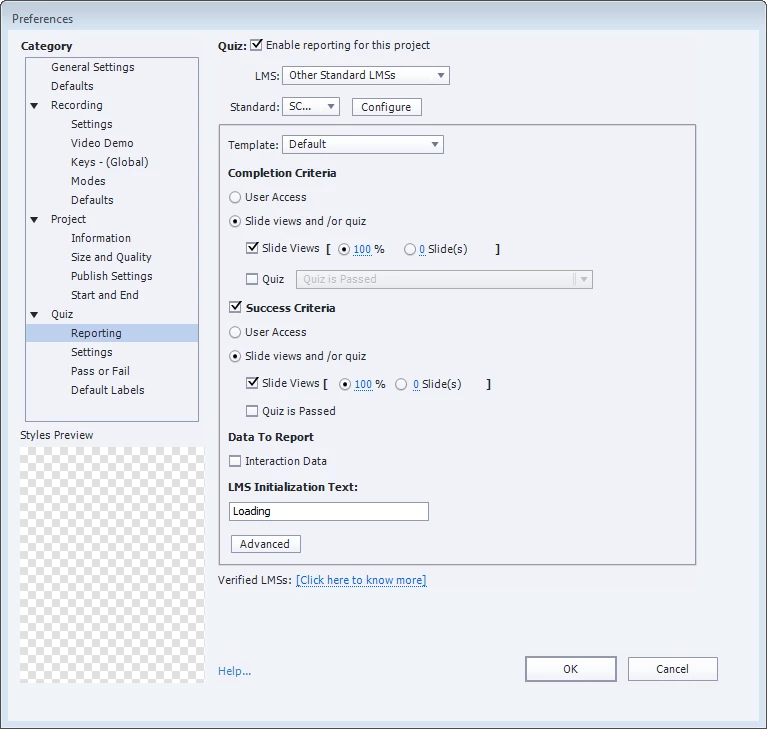

    This topic has been closed for replies.
    Correct answer Lilybiri

    I had several clients with issues when slides are not totally viewed, maybe it depends on the LMS used. For that reason I will never require 100% for slide views.

    Uploading to SCORM Cloud would be a good test to see if the issue is with the LMS or with the CP settings. SCORM 2004 causes more problems than 1.2. Needing to create artificially a quiz by having an extra scored object that the user has to click is a workaround which I used as well, but always in combination with a normal quiz.

    2 replies

    Paul Wilson CTDP
    Community Expert
    Community Expert
    December 30, 2016

    If you select an object that you can guarantee will be clicked by all users, say the Next button on the second to the last slide of the course for example, and then select Reporting / Include in the quiz for that one item you will give users a score of whatever points you assign to that object. You could set it at 100 Points and with all the settings the same as what you have users will be either complete because they viewed all slides and get a score of 100 or incomplete and no score.

    2016-12-30 2-24-12 PM

    Incidentally, a slide view is counted as viewed if any of the frames within that slide are visible to the user. The slide does not need to get to the end of the slide to count as viewed.

    Paul Wilson, CTDP
    Lilybiri
    LilybiriCorrect answer
    Legend
    December 30, 2016

    I had several clients with issues when slides are not totally viewed, maybe it depends on the LMS used. For that reason I will never require 100% for slide views.

    Uploading to SCORM Cloud would be a good test to see if the issue is with the LMS or with the CP settings. SCORM 2004 causes more problems than 1.2. Needing to create artificially a quiz by having an extra scored object that the user has to click is a workaround which I used as well, but always in combination with a normal quiz.

    Lilybiri
    Legend
    December 30, 2016

    100% slide views is often 'risky'! Are you sure that each slide is viewed until the last frame? Example: if you have a Next button with the action 'Go to Next Slide', the frames after the pausing point are never visited.

    SM6601Author
    Inspiring
    December 30, 2016

    Our LMS is showing Completed but with a score of 0 using the above settings.

    What do you mean, "frames after pausing point?"

    This has been a reliable method for my courses, but we don't like the score of 0 going on the transcripts.

    Lilybiri
    Legend
    December 30, 2016

    In that case you probably didn't have any interactive object of that kind. Buttons and shape buttons, when they pause a slide, have an active and a non-active part. The frames in the non-active part will be skipped with the action 'Go to Next slide'.