


SCORMing Captivate files - help!!
Hey,
Looking for some help. I've published some files from Captivate in SCORM 1.2.
I'm not too familiary with SCORM, so I've published them as best I know how.
When they are loaded into an LMS, the files can be skipped through and show as complete, even if they haven't been.
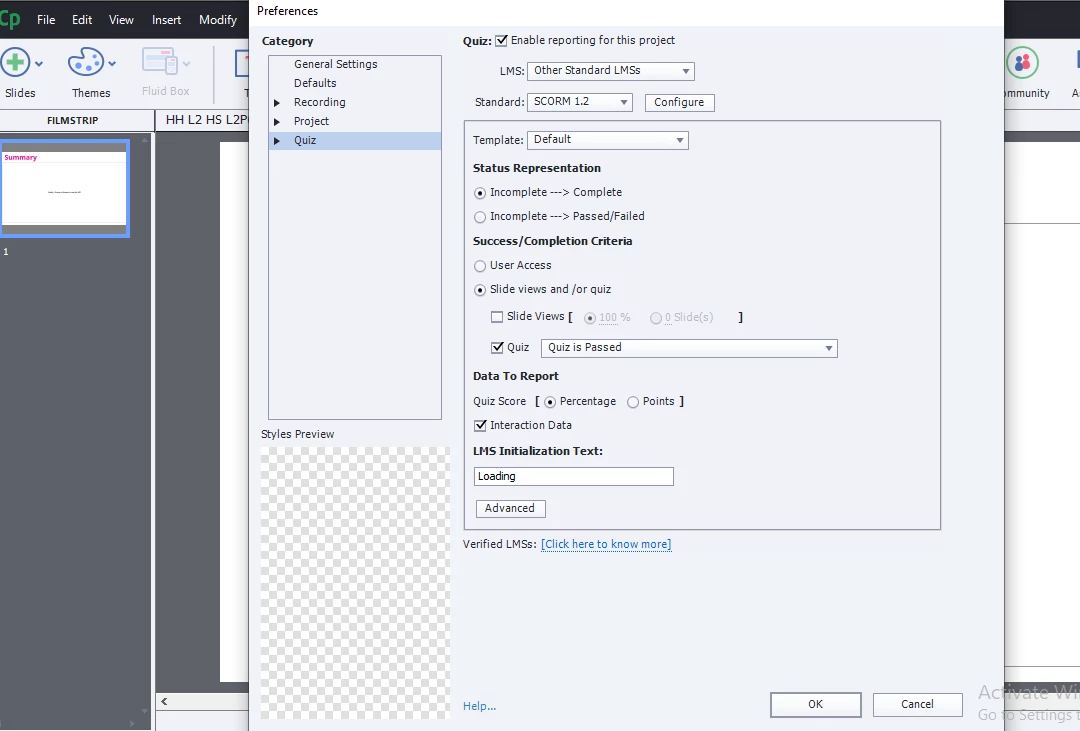
Can anyone help me understand how to SCORM captivates correctly please? I've included below a little information to see if this helps further:
We’ve run some tests on the SCORM Cloud platform which seem to indicate that the modules provided have been configured to return a ‘completed’ status to the Knowledge Centre if the learner exits the module before achieving a 100% score. This indicates to the Knowledge Centre that the module has been completed and it therefore unlocks the next one. It would also explain why the score is displayed as 0%. It would be better if the module could return an ‘incomplete’ status until the 100% pass mark has been achieved.
Alternatively, if the module returned a ‘pass/fail’ status as well as a ‘completed’ status the Knowledge Centre would allow learners to retake the module until they achieved the 100% pass mark.’
We have also tried to set as Incomplete > passed/failed and set slide views to 100 but that doesn't seem to work.
Can anyone offer any help please?
Thanks
 AdChoices