Participating Frequently
July 18, 2018
Question

Screenshots are not apearing in captivate

  • July 18, 2018
  • 3 replies
  • 379 views

Hello

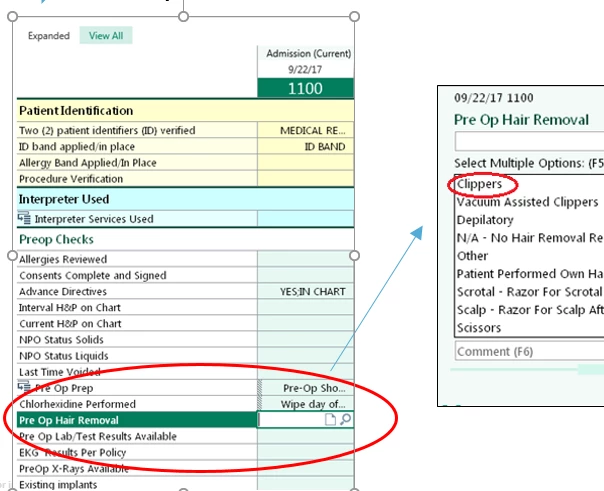
Example 1 of screenshots that are in powerpoint presentation below but when I load into captivate, example 2 shows blank. do you know what I am doing wrong? Thank you
Example 2

    This topic has been closed for replies.

    3 replies

    Inspiring
    July 19, 2018

    In PPT, select the objects you want, right-click (on Windows, ctrl-click on Mac) and select "save as picture". You can then use the resulting PNG in your Captivate.

    VickieM
    Participating Frequently
    July 19, 2018

    Hi Elizabeth,

    Possible Work Around:

    You might consider using the Windows Snipping Tool to cut and paste or save the images as a PNG.


    Copy and Paste:
    If you decide to copy the images from the PowerPoint, use the Snipping Tool to select the images. Then copy and paste them directly onto the slide in Captivate.


    Saving Images as a PNG:

    If you save the images as a PNG, select them using the Snipping Tool and save them to a local directory. Then import them from the directory into the Captivate library. Drag the images from the library onto the Captivate slide.

    Thanks

    Lilybiri
    Legend
    July 19, 2018

    @veem If the Import PPT functionality has been used, could this be a solution? An imported PPT slide is sort of a movie slide, I don't know when this image had to appear?

    Lilybiri
    Legend
    July 18, 2018

    Which format fo you use for the sreenshots: GIF, JPEG, PNG, ???

    Participating Frequently
    July 18, 2018

    I do not know. This powerpoint was given to me by my regional organization.

    Elizabeth

    Lilybiri
    Legend
    July 18, 2018

    Unzip the PPT, you'll see the images and can check the format.