Inspiring
April 11, 2023
Answered

Script only runs once

  • April 11, 2023
  • 2 replies
  • 1287 views

Hi

I found the solution for this problem earlier but cant find it again so I will ask here:)
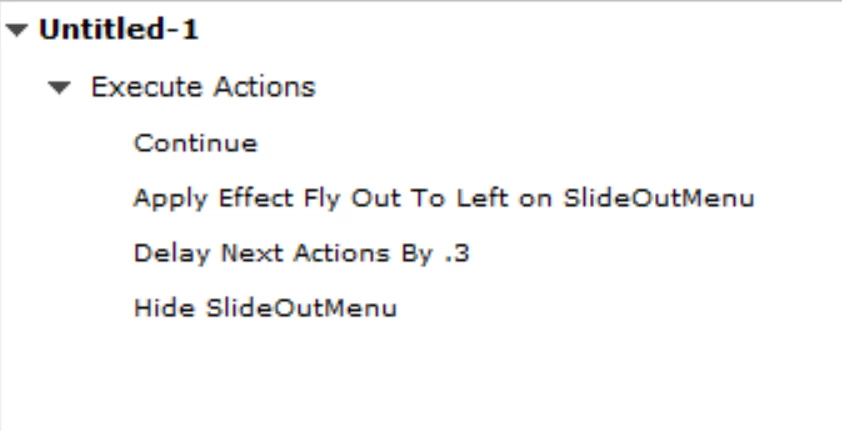
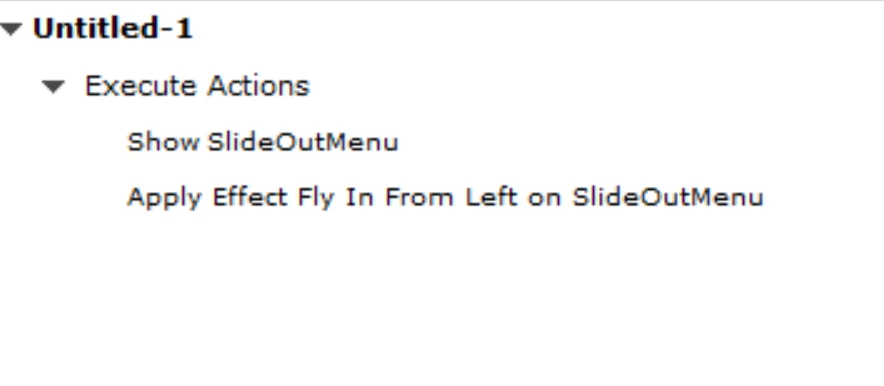
I have created a slide out/in menu with the scripts below.

They work as they should but only once. 

The first script are on a hamburger menu that slide the menu in to the right. The last are an X button inside a group that slide the menu out to the left.

This work only once.  Could anyone point me to the solution that I no more remember 🙂


    This topic has been closed for replies.
    Correct answer Lilybiri

    Actionscript is no longer important since it was used for SWF output. But I think you mean an advanced action, which will be converted to JavaScript on runtime.

    Did you read the blog post for which I posted the link? It has a step-by-step workflow. You need to create custom effects using a precise motion path. than make that custom effect available to be used in an advanced action. The advanced actions themselves are explained in the blog post. I don't think you have followed the workflow as explained.

    If you want more details about preparing a custom effect for use in an advanced action, here is another blog post link:

    https://blog.lilybiri.com/how-to-use-custom-effect-in-actions


    2 replies

    Lilybiri
    Legend
    April 11, 2023

    Indeed, I would use a Boolean variable to check the status. The problem you have however is due to the use of default motion paths from the Entrance and Exit category. You need to create custom effects using the Motion path category so that you can define the exact start and end points of the motion paths. Have a look at this blog post which describes the exact workflow:

    https://blog.lilybiri.com/sliding-menu


    mysk83Author
    Inspiring
    April 12, 2023

    U have a post for every problem. Love it 🙂

    TLCMediaDesign
    Inspiring
    April 11, 2023

    I don't see that you are toggling a variable to know which on to execute. Or are those two different action attached to 2 different buttons?

    mysk83Author
    Inspiring
    April 12, 2023

    This is for two buttons yes : )