
Inspiring
August 24, 2016
Question

Script_Window in Captivate 9 fails with js comments

  • August 24, 2016
  • 3 replies
  • 638 views

Hi

... just spent the last hour trying to debug some JS code so hopefully this will save someone the headache:

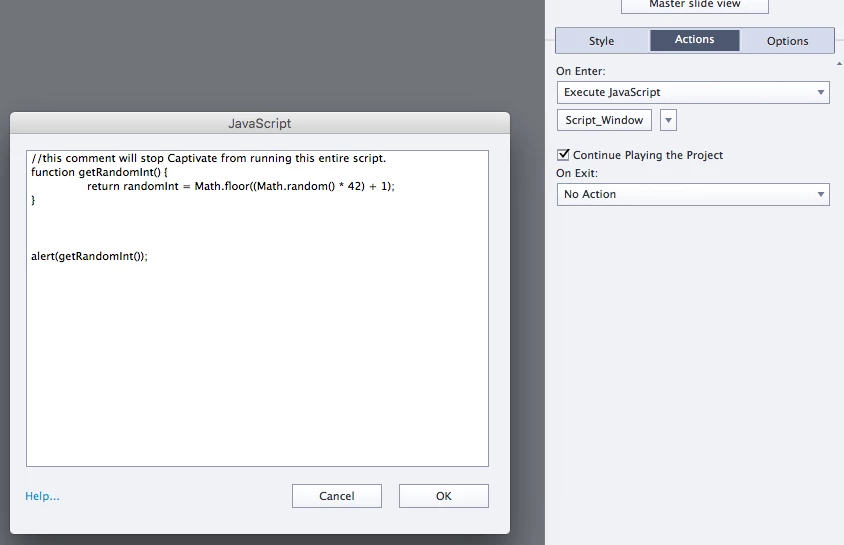
Under the Properties tab, in the Actions panel lies a button called "Script_Window" which is where we're supposed to be able to enter own our javascript.

I found out the hard way that Javascript comments are not welcomed in this script window. Once it encounters these comments in your code it stops processing all together, not just that specific line of code.

Captivate 9 vers 9.0.2.421 on Mac OSX 10.11.6
This topic has been closed for replies.

3 replies

Inspiring
August 25, 2016

I did a little more testing:

I tried these simple JS calls in the script_window:

and I'm still getting the same behavior with Chrome and FF. (FF 48.0.1) (Chrome Version 52.0.2743.116 (64-bit))

Hope this helps,

Rich

Inspiring
May 9, 2020

I'm having challenges, too, trying to publish in the script window.


TLCMediaDesign wrote:

---------------------------------------------

I've found that loops are very iffy, single quotes are bad, spaces in a functions arguments can be bad.


The best option is to include a JavaScript file. You can publish, open the JS file and the index in an editor and test you code much easier. Or you can open the "template" JS file in an editor, and test while previewing in a browser without publishing.

-------------------------------------------

I need some guidance about where exactly to put my js code. Does it all go into the index.html file?

Thanks in advance.


Lilybiri
Legend
August 25, 2016

Whenever functions are involved it is a better practice to insert those in the JS file that gets published with the CP-file and only call the function in the JS window in Captivate. Same for comments. However for just a random number, I would have used the JS API to set a user variable in Captivate to that value wiyh the JS Math functions.

TLCMediaDesign
Inspiring
August 25, 2016

Completely agree with Lieve. because all of the scripts are converted to strings with lot's of escapes, you never know how it will turn out.

I've found that loops are very iffy, single quotes are bad, spaces in a functions arguments can be bad.

The best option is to include a JavaScript file. You can publish, open the JS file and the index in an editor and test you code much easier. Or you can open the "template" JS file in an editor, and test while previewing in a browser without publishing. So much easier.

Allen_Partridge
Adobe Employee
Adobe Employee
August 25, 2016

Rich,

That isn't what I'm seeing. I tried your code as above - with the comment and it worked without issue. Cp9.02, Google Chrome. Previewing at HTML5 in browser.

--Allen