
Participant
March 6, 2017
Question

Scrollbar issue in SCORM package

  • March 6, 2017
  • 1 reply
  • 358 views

Hi there,

I have a problem with the SCORM-package I created. I am using the following breakpoints:

Desktop/L: 1280x720

Tablet/M: 768x1024

Mobile/S: 360x640

In all browsers is a scrollbar on the right:
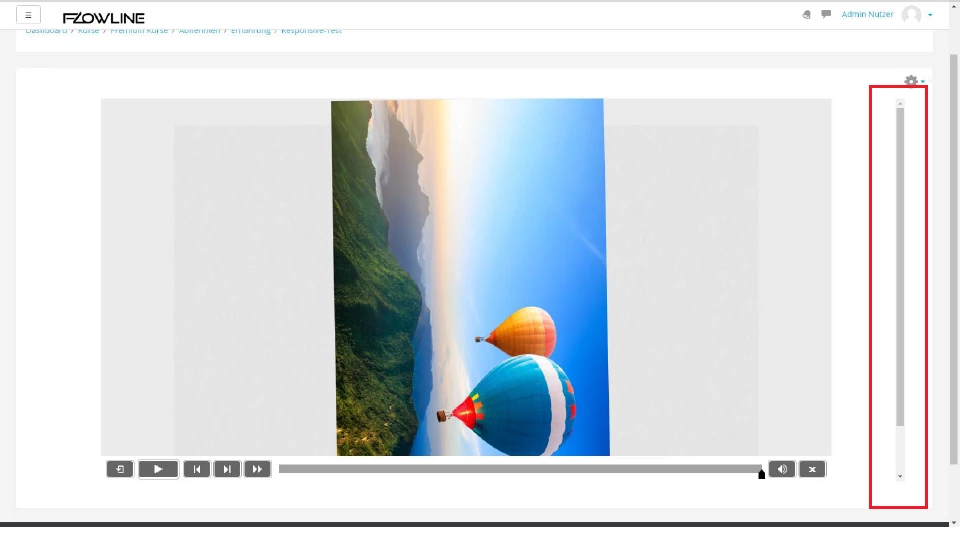
I searched through the zip-file and found "height="768"" quite often. Maybe that´s the problem?

Am I missing some configuration in Captivate?

Best regards,

Harry

    This topic has been closed for replies.

    1 reply

    Lilybiri
    Legend
    March 6, 2017

    Did you take into account the height of the default playbar that you have been using? It has to be subtracted from the height that is available on screens. Moreover maybe the UI of the LMS or the browser also has to be taken into account. In the screenshot that you show the window is not maximized.

    Participant
    March 7, 2017

    Yes I was saving some space for the playbar.

    LMS is Moodle 3.2 - I tried set scorm-player height & width to "100%" and "1280x720" => nothing changes.

    Also the browser behaves simliar whether mamimized or down to mobile size.

    Maybe found something else: Captivate shows in publish settings - project - information "Resolution: 1024 x 627"