
Scrolling issue when recording a Software Simulation
I have an issue that I can't seem to find from googling or looking around on the forms.
I'm recording software simulations, and my settings are as follows:
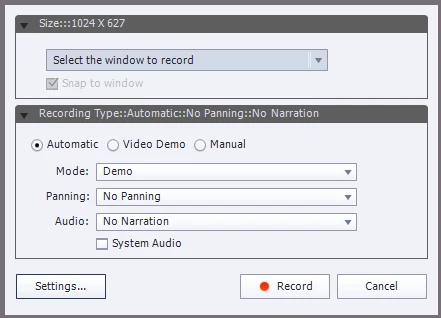
Whenever I have to scroll down during my recording, Captivate captures a video. This is fine except on these particular videos when you watch the captivate back the last frame bounces back to the first frame before it proceeds to the next slide. This looks like a weird hiccup when the learner is watching the content.
I've tested every setting I can think of that might contribute to this, but no matter what I do the scrolling videos still have this "hiccup" frame when I record like this.
I don't see this extra frame if I play just that slide using the timeline at the bottom, but I do see it when I preview the captivate project, so I'm unable to see any possible edits to do on a particular slide.
Others that also use captivate at my office are experiencing the same thing, and one of my team members was able to get around it by recording that slide again as a video demo instead of a software simulation. This seems like a workaround to me, and not how the software was intended to work.
This seems like a really silly thing for me to not be able to figure out, but I'm beating my head against the wall. Any ideas as to what's causing this? Is it fixable?


 AdChoices