



Dirlo
Inspiring
September 9, 2020
Answered

Scrolling Text Widget

  • September 9, 2020
  • 3 replies
  • 1560 views

...

Hello Captivaters !... 😉

This morning, as I wanted to work on calculations with decimal numbers, I checked what I have done with plain numbers... And what a surprise when I realized that there was some problems !!!...

This occurs when I used the "Scrolling Text Widget".

(I had to use it as I wanted my text with a right alignment)

And it appears that this Widget doesn't play the same in different browsers.

# Here is the first published project : http://soutien67.fr/math/activites/calcul/multiplication/Multiplication-en-colonnes-03/index.html

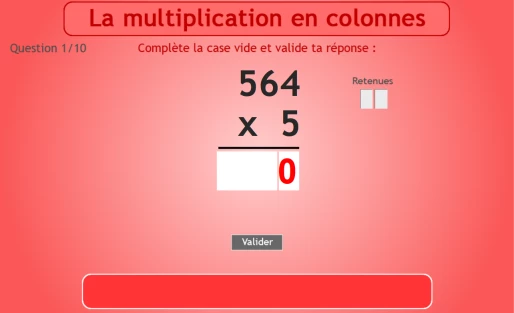
With Firefox, everything looks fine :
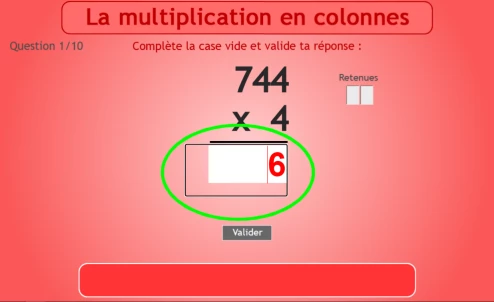
But with Chrome (or Edge), an uggly border appears around the widget...
# Here is a second published project : http://soutien67.fr/math/activites/calcul/multiplication/Multiplication-en-colonnes-05/index.html

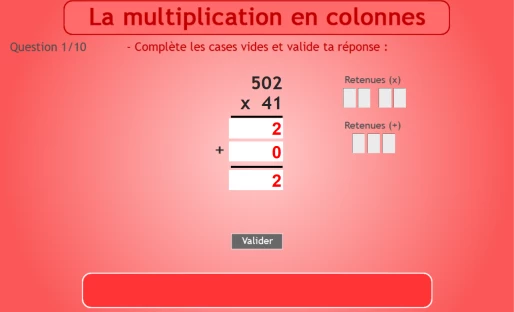
With Firefox, once again, everything looks ok :
But with Chrome or Edge, scrolling butons appear !... (which are not attended !...)
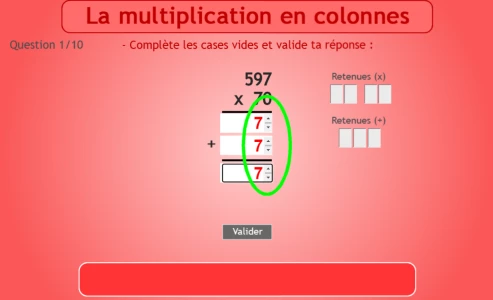
(I manage to delete this scrolling buttons by increasing slightly the height of the Widget... But...)

=> I understand that this has something to do with the browsers and not with Captivate... And I remember when I published these projects everything was fine in all browsers...

=> I'm finally wondering if the CPExtraWidget could be a solution for this... Does it permit a right alignment in a simple TEB ?... (I just checked on the new infosemantics site but didn't find an answer...)

=> Or is there another simple solution ?

PS : I strongly hope that in the next version of Captivate (?), we will have the opportunity to change the alignment in a TEB !!!...

Thanks for your attention !...

Happy Captivating !...

😉

...

    This topic has been closed for replies.
    Correct answer TLCMediaDesign

    You can right align a TEB with this Javascript


    setTimeout(function(){document.getElementById("Text_Entry_Box_1_inputField").style.textAlign="right";}, 0500);


    The bold text is the name of the TEB. You have to execute this for each TEB.


    Or you can set all TEBs with this Javascript


    setTimeout(function(){ $("input").css("text-align", "right"); }, 0500);

    3 replies

    TLCMediaDesign
    TLCMediaDesignCorrect answer
    Inspiring
    September 10, 2020

    You can right align a TEB with this Javascript


    setTimeout(function(){document.getElementById("Text_Entry_Box_1_inputField").style.textAlign="right";}, 0500);


    The bold text is the name of the TEB. You have to execute this for each TEB.


    Or you can set all TEBs with this Javascript


    setTimeout(function(){ $("input").css("text-align", "right"); }, 0500);

    Dirlo
    DirloAuthor
    Inspiring
    September 10, 2020

    ...

    How can I thank you ???!...

    I've just tested your code in a new project... Seems to be exactly what I expected !!!...

    If I had knew this one year ago, this could have saved me a lot of time (and troubles !)...

    You make me smile for the day !... (even if now, I'll have to change all the projects in which I used this "Scrolling Text Widget")

    BIG thank you again !...

    😉

    ...

    TLCMediaDesign
    Inspiring
    September 10, 2020

    If it can't be done natively in Captivate, you can do most anything with JavaScript.


    Glad to help and glad that it worked for you.

    Widget King
    Inspiring
    September 10, 2020

    FYI, there is no CpExtra related feature for making a text entry box align to the right. Though I can see how that would be useful in this case.

    Lilybiri
    Legend
    September 10, 2020

    Tristan, was bit stupefied by your comment, thought I wrongly mentioned THE widget. I didn't reference to CpExtra widget in this thread, just double-checked. Nor did Ludovic. 

    The widget allows fixing several problems with TEBs, not the alignment indeed.

    Dirlo
    DirloAuthor
    Inspiring
    September 10, 2020

    ...

    Good morning Lieve !...

    In fact, I did mention it in my first post :

    "=> I'm finally wondering if the CPExtraWidget could be a solution for this... Does it permit a right alignment in a simple TEB ?... (I just checked on the new infosemantics site but didn't find an answer...)"

    Happy Captivating !...

    😉

    ...

    Lilybiri
    Legend
    September 9, 2020

    Which font did you use? 


    Is this option 'Hide selection ...' activated:

    Dirlo
    DirloAuthor
    Inspiring
    September 9, 2020

    ...

    Hello Lieve !...

    I use Arial (Which I think is safe ???...)

    I also just checked these projects on a tablet... and the place is not long enough to enter all the numbers, as on a computer ... GRRRRR !!!... This Widget seems very problematic ?...

    Thanks for your answer!...

    😉

    ...

    Lilybiri
    Legend
    September 9, 2020

    Need time to double-check. This is one of my favourite widgets and never had that type of issues. That it looks different in each browser is because there is no real HTML5 standard compared with the good old SWF period. You may find that another websafe font is less sensitive. 


    I may be back later on. Did you check the setting I showed after editing my reply? That is for the rectangle showing up.