
Participant
June 6, 2016
Answered

Scrolling text widget displays on top of feedback text
  • June 6, 2016
  • 2 replies
  • 608 views

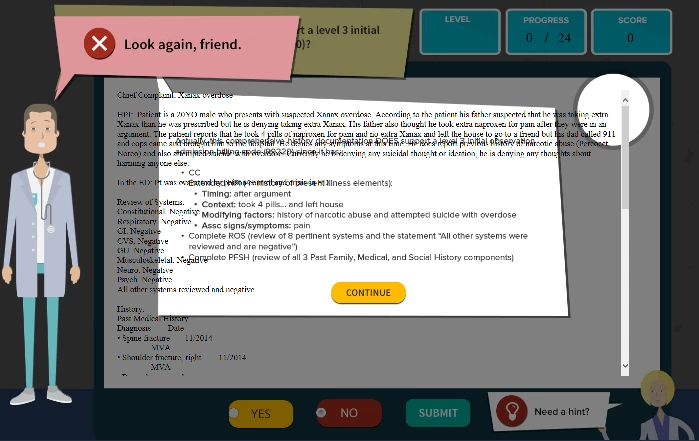
In HTML5, the scrolling text widget is displaying on top of feedback text. Some background: I converted the default success and failure captions into smart objects so I could use an image overlay for correct/incorrect feedback. When feedback appears, it's a full-screen image. The scrolling text widget shows through and actually lays on top of the feedback image. This happens even when the widget is at the bottom of the timeline. Any ideas on how we can have the feedback overlay (smart object) appear at the highest level (on top)?

This topic has been closed for replies.
Correct answer mohanadas

Hi Amy,

Can you try the following:

1. Close Captivate and save your project

2. Go to the installation directory of Captivate [usually this is: C:\Program Files\Adobe\Adobe Captivate 9 x64]

3. Copy the file "AdobeCaptivate.ini" to your Desktop

4. Open this file in editor and change the value of "UseWidget7" to 1.

5. Save it and copy this back to its original location

6. Relaunch Captivate and open your project

Can you try this and see if it helps?

Thanks,

Mohana

2 replies

mohanadas
Adobe Employee
mohanadasCorrect answer
Adobe Employee
June 8, 2016

Hi Amy,

Can you try the following:

1. Close Captivate and save your project

2. Go to the installation directory of Captivate [usually this is: C:\Program Files\Adobe\Adobe Captivate 9 x64]

3. Copy the file "AdobeCaptivate.ini" to your Desktop

4. Open this file in editor and change the value of "UseWidget7" to 1.

5. Save it and copy this back to its original location

6. Relaunch Captivate and open your project

Can you try this and see if it helps?

Thanks,

Mohana

Lilybiri
Legend
June 8, 2016

Thanks, Mohana, my memory failed because I knew about this solution.

Lilybiri
Legend
June 6, 2016

I suspect you mean (smart) shapes (smart objects are totally different things to me, they do not exist in Captivate but in applications like Photoshop)? Are you sure the Alpha is set at 100% for the (smart) shapes? Are those feedback shapes for an interactive object or is this based on a quiz slide? I want to check your setup but do not have enough details.

I just tried it out in CP 9.0.1.320: had a shape Success feedback covering up a scrolling text interaction. I previewed HTML in Browser and could see the problem indeed. It plays well for SWF output. I just previewed. Did you publish and upload to a server or LMS to test ?

Just FYI: I also tried with a custom feedback, to be shown when clicking on a button: the Scrolling Text interaction will always be at the top of the stack, whatever its position on the timeline, for HTML output. It works correctly in SWF output. I logged a bug report.

Participant
June 8, 2016

Thanks for your feedback and troubleshooting help.