
Inspiring
July 1, 2015
Question

Separate .swf files into one Captivate 8 Project?

  • July 1, 2015
  • 2 replies
  • 153 views

I'm updating a Captivate 8 project from another supplier and when they gave me the captivate file, every slide has its own background (see image).
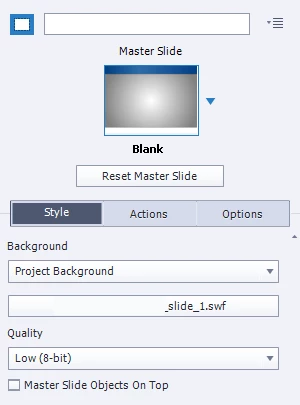
Why would you build a project like this? I can't select anything on the slide's timeline, no audio, no images, and there's a click box with no pause point on every slide with no action.

How were these imported? And how can I edit them?

This topic has been closed for replies.

2 replies

RodWard
Community Expert
Community Expert
July 1, 2015

Is it possible this might have started out as a PowerPoint deck that was imported into Captivate? If so, the backgrounds that you cannot edit are probably just the PPT slides.  Check in the Library to see if there's a PPT file listed there.

Lilybiri
Legend
July 1, 2015

This seems to be an 'old' project, do you know in which version it has been created?  It is the quality, which is set to Low which was default in versions before 6.

Can you find the SWF files in the Library? Did you try to change the Background to Master Slide Background? Can you post a screenshot of the Timeline?