


Participant
May 28, 2021
Answered

Setting Up Advanced Actions with change state and changing variable

  • May 28, 2021
  • 1 reply
  • 437 views

Hi community, 


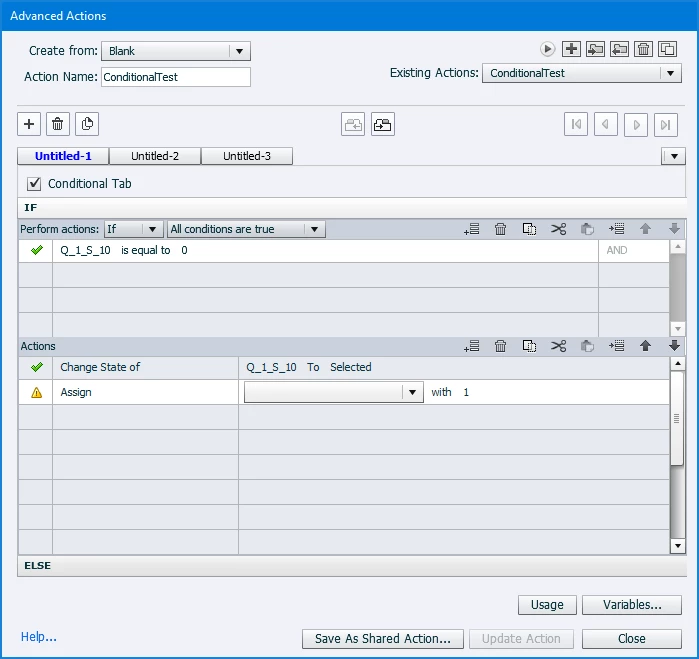
Struggling with a multichoice quiz I'm creating using shapes. I can't save my advanced action with both change state and assigning a number to the variable. Any suggestions? 


This topic has been closed for replies.
Correct answer Lilybiri

Reason of your problem: you are using the same name for an object and for a variable. Captivate needs  unique names. That is the first requirement!

Please use the Preview window to take a screenshot. You find it under the first button of the top right control panel (looks like an arrow).

More in::

http://blog.lilybiri.com/advanced-actions-dialog-box-in-captivate-2017


1 reply

Lilybiri
LilybiriCorrect answer
Legend
May 28, 2021

Reason of your problem: you are using the same name for an object and for a variable. Captivate needs  unique names. That is the first requirement!

Please use the Preview window to take a screenshot. You find it under the first button of the top right control panel (looks like an arrow).

More in::

http://blog.lilybiri.com/advanced-actions-dialog-box-in-captivate-2017


Participant
May 28, 2021

Thank You!

Lilybiri
Legend
May 28, 2021

Did changing the names of one of the item types solve the problem? If yes, please mark the helping answer as being correct for the sake of future users looking for solving a similar issue.
