
Participating Frequently
July 25, 2018
Question

Setting up Captivate quizzes with 2 different failure messages

  • July 25, 2018
  • 1 reply
  • 611 views

I found an old message on this bard about using states and advanced actions to create 2 different failure/1 pass messages after a quiz but have some more questions.

To set things up here is what I need to do. I am creating a quiz where an individual will have 2 chance to pass. I want to have one message show up if they pass the exam, one message if they fail the first attempt (allowing them to retake the quiz or exit to review material in other modules) and a third message telling them what to do if they fail a second time (and exit the quiz). My file only contains 2 non-quiz slides there is no need to link to anything else.

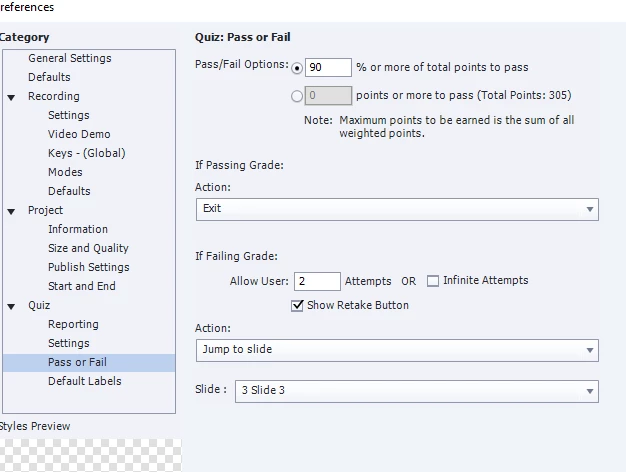
I used Lilybiri directions to create the 3 messages using states and advanced actions. What I need help with now, is figuring out the Quiz Preferences settings or another way to generate the appropriate buttons. Not sure if these setting are right or if I need to do something else. Slide 3 is the first question slide.
This topic has been closed for replies.

1 reply

Lilybiri
Legend
July 26, 2018

Sorry, but cannot remember my 'directions'.... It would help if you posted a preview of those advanced actions and tell which event is triggering them. Probably On Enter for the score slide?

About the Quiz Preferences now. I use to recommend to have at least one slide after the score slide. Reason is that the actions you specified for Pass/Fail are only executed when the last frame of the score slide is reached, after the learner's click on the Continue button (which is the most essential button on the score slide). I see that you have set Pass action to Exit. Bit reluctant myself to use that action, would have put it On Enter for the slide after the score slide.

The Failure action will only occur after the last - here second - attempt. You set it to go back to the first quiz slide, but that is contradictory with what you tell in your question. After the first attempt, the Retake button will take the learner to the first quiz slide. If I understood well, this is not what you want to happen after the second failed attempt?

mcyarasAuthor
Participating Frequently
July 26, 2018

Here are your instructions from Jan. 18, 2018. What I need is a way to have the retry button only show up after the first failure. That is where I'm lost on the way to set this up. Perhaps another conditional advanced action is the solution? Thanks.

If it is indeed the score slide that is meant, I would prefer to use one shape as text container with multiple states. However you have to do several things to make it work:

  • Delete the Review messages under the button Suiz Result Messages in the Quiz Preferences, Settings
  • Make the Review area on the Score slide very small and put it out of the way (do not delete it)
  • You have to know that all embedded objects on the score slide (and quiz slides) have absolute priority in the stack. You will have to create your custom text container is a space that is not taken by  such an embedded object. Hence my second tip to make the review area small to create such space.

Using states instead of individual feedback messages will allow you to have not only text but even images and audio in those states.

You have to trigger the advanced action with the On Enter event of the score slide. SmartShape_5 is the multistate shape, Normal state is shown for Passed.

@

If you prefer the inidividual text containers as Jeremy described, please group them. It will be easier to write out the advanced action with the 3 decisions:

    Hide Group

    Show appropriate feedback

That way you can duplicate the decisions and will have less editing to do.

Lilybiri
Legend
July 26, 2018

That action was to replace the standard Review message on the score slide.

The Retake button on the score slide (I think you mean that button when you say 'retry'?) is a default button with its functionality built in: it will only appear when the first attempt is failed, it will not disappear after the second failure because the number allowed attempts on quiz level is reached.